

The ultimate guide to test automation in 2026

Dmitry Reznik
Chief Product Officer

Summarize with:
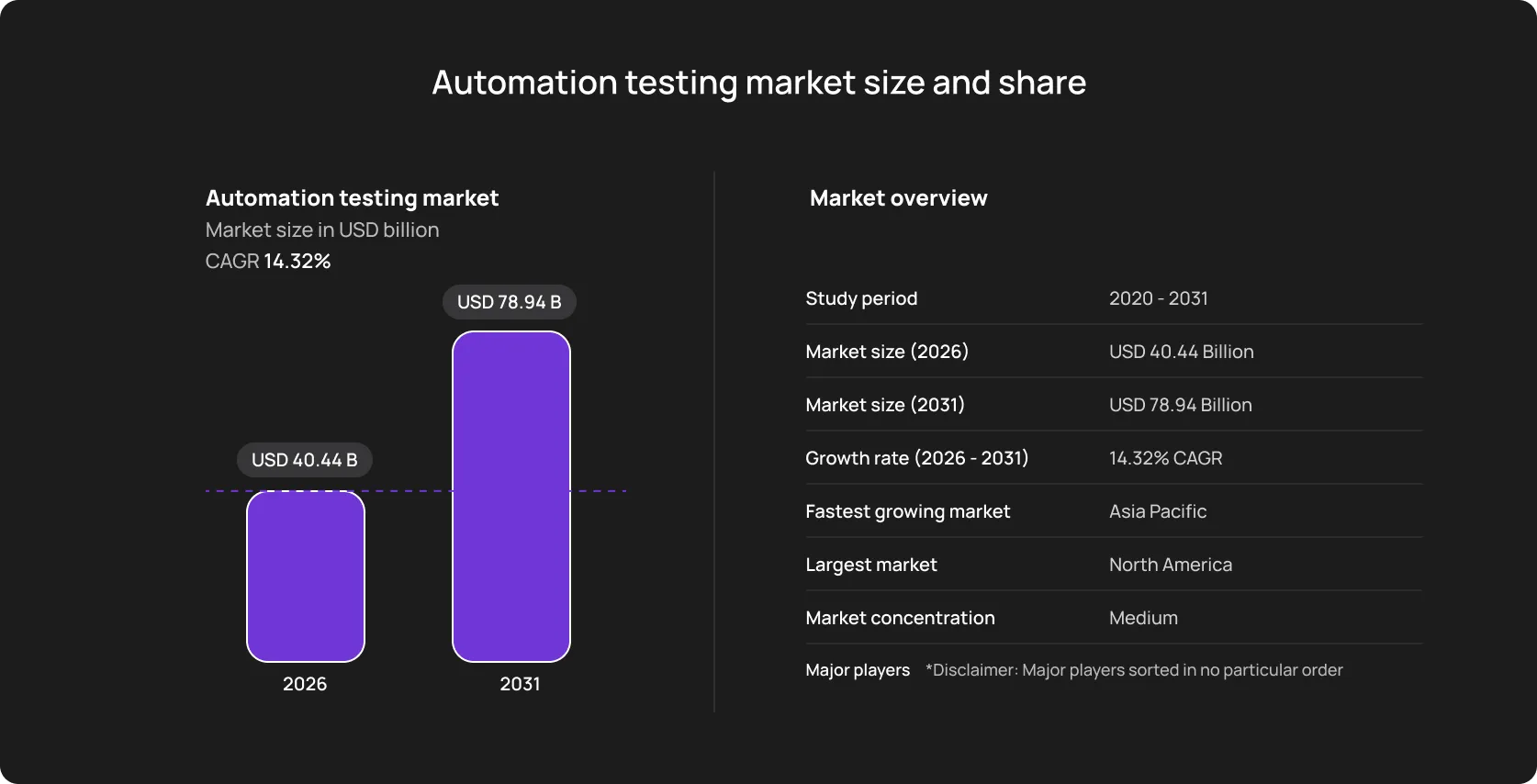
The previous year was a mad one for many reasons. QA automation is just one among dozens — the global automation testing market has topped USD 40 billion in 2026 and is set to reach USD 78.94 billion by 2031.
And that feels like a paradox because development cycles are shrinking from months to daily deployments, and under no circumstances can manual QA keep pace with the pipeline. At the same time, not that many companies gain real value from AI, and genuinely automated testing is still a nice-to-have technology.
IBM proved that well-thought-through AI implementation can be effective — they achieved up to 90% improvement in turnaround time for their SAP client with a new GenAI tool.
Just compare: a QA engineer can execute 50 to 80 test cases per day (in the best cases). A product shipping daily builds with hundreds of affected flows can’t wait two weeks for a manual regression cycle. The math isn’t mathing.
This is why a clear test automation strategy can’t be a nice-to-have investment for engineering teams. Otherwise, they have two choices: either slow down to accommodate manual testing, or they ship faster and accept the risk of regressions reaching production. Neither is a sustainable position.
This guide covers what tech leaders need to understand about test automation in 2026: what it is, what types of automation exist, how tech-savvy teams implement it, what challenges they typically encounter and how they mitigate them, and what the current trends are.
What is test automation?
Specific software tools that execute tests against an application continuously and constantly, without significant manual intervention. To be completely fastidious, it is a set of specific, predefined actions that have a specific trigger to start.
That is, we replace playing it by ear (a tester who mainly relies on their experience) with a script that performs the same actions, checks the expected outcomes, and reports pass or fail. The only, yet significant, difference — the tool goes through the same flow every single time, and this eliminates human errors.
An operational difference is the time needed for execution. From days/weeks to days or even hours, such cuts reduce many associated operational spending.
How automated tests work
- Technical level: an automated script interacts with an application the same way a user would. It navigates to a URL, enters data into fields, clicks buttons, and does everything you need to understand whether the app works as expected.
- Operational level: The tech team should clarify the business goal for testing strategy and, based on that, develop test suites, group them into cases that cover a specific feature, flow, or layer, and constantly maintain suites.
The verification might be simple (like checking whether a page title matches) or specific (like confirming that a database record was written with the correct values).
That’s a classical approach.
A modern one — wire those suites into a CI/CD pipeline to trigger them automatically when developers push code or deploy a build.
What automation is actually used for
It handles repeatable and usually high-volume testing work. The most common use cases:
- Regression testing: A calming type in some sense, because it runs after every code change and is set to confirm that nothing was badly affected.
- Smoke testing: A lightweight subset of critical tests run quickly after deployment to confirm the application is operational.
- API testing: Validating that service endpoints return correct responses across inputs and error conditions.
- Performance testing: “Loads” the app to measure how it behaves under stress.
- Cross-browser and cross-device testing: The same user flows across multiple browser/OS combinations to check if all features work correctly for all users.
It is not always a good idea to use automation for exploratory testing, usability evaluation, accessibility judgment, and anything that requires human intuition or business logic.
Why test automation matters today
It’s a direct response to how software development operates right now. If you want your product to outperform competitors, you must find a way to execute end-to-end testing (or a feasible alternative) faster and more reliably.
Release cycles are still getting faster
Just 10 years ago, the typical shipping cadence was monthly or quarterly. Today, CI/CD pipelines have made weekly, daily, and multiple-times-daily releases standard practice.
But every release still needs validation. If that validation is manual, it either creates a bottleneck before every deployment or it gets compressed into something too shallow to be reliable.
At this point, the industry came up with a solution: tests run simultaneously and on every commit and return clear-cut feedback for all associated specialists.
System complexity has outpaced manual testing capacity
A small-to-mid SaaS rely on APIs, authentication providers, payment processors, and analytics services. Add to this internal microservices and you get severe uncertainty under atypical conditions. To ensure proper functionality, you must test everything as thorough as you can.
And manual testing is not feasible in this case, as the number of flows, data combinations, and integration states that need validation grows non-linearly with product complexity.
Regression suites grow with the product
Every new feature adds test scenarios that need to be validated not just once, but on every subsequent release.
Teams have been developing an app for two years might have several hundred regression test cases that need to run before a release can go out. Manual regression testing will take days or even weeks. Running them automatically takes minutes or up to a couple of hours.
This is the core problem automation solves. The automated test execution costs stay almost the same regardless of suite size: 50 more tests or 500 more tests. At least, this doesn’t multiply execution time the way it would for a manual tester.
What teams actually gain
- Faster feedback: Modern tools ping the dev team instantly on whether their changes broke something, right after finishing the suite.
- Removed mess with standards: Automation makes the human factor less impactful: fewer variations between testers, no missed steps, end result doesn’t depend on a specific tester — if someone got sick or burnt out, the testing move keeps going.
- Speed-up for the release cadence: Frequency of releases adds to confidence. Validation directly in the pipeline lets teams ship more often and with more confidence because they don’t depend on the mentioned human factor and conditions that they don’t control.
- Efficient QA working time: QA engineers focus on exploratory testing, edge case analysis, and quality strategy — exactly because automation handles the routine.
Types of test automation
A proper testing framework exists on several layers. And a real step forward is matching the testing type to the desired business impact rather than just increasing coverage percentage.
Let’s break down these types.
Unit testing
It’s the foundation of any automated framework: highly specific tests for individual components validation or isolated function checks.
- Example: A new logistics app gets a basic function that calculates shipping cost based on weight and destination. A unit test passes the previously added inputs (2kg, within the country) and asserts the output is the correct value. A separate test passes an invalid input and confirms the function throws the appropriate error.
- Main feature: This type tests isolated logic, so unit tests execute in milliseconds. They provide instant feedback to developers without distracting them from writing code.
Integration testing
Software now combines dozens or even hundreds of interconnected microservices. Integration testing verifies the interactions between these independent services, APIs, and databases.
These tests run slower than unit tests because they involve real I/O — actual database queries, real HTTP calls, genuine file system operations. They also require more setup: a test database with a known state, a seeded record to query against, and a mock of the third-party service that behaves predictably.
- Example: Simple verification chain: If a data payload is formatted correctly and sent to the third-party Stripe API, the test will return a “payment received/successful” response.
- Main feature: It catches communication failures and broken data contracts.
End-to-end testing
E2E testing is when predefined algorithms complete the entire user workflow: scripts interact with the app exactly as a real human would.
- Example: Launch a browser, navigate to the menu, log in with test credentials, add an item to the cart, complete a purchase, and verify that the order confirmation screen includes important delivery info.
- Main feature: Even if all unit and integration tests pass, an E2E test proves that the actual product works from the end-user’s perspective.
Regression testing
Regression testing is not a distinct technical category, it’s just ensuring new updates didn’t break existing functionality — running your previously created tests (unit, integration, and E2E) every time the codebase changes.
- Example: If a team redesigns the user profile page, the automated regression suite will run in the background to ensure that the core Login and Checkout functionalities aren’t accidentally broken by the new CSS or JavaScript updates.
- Main feature: With automated regression, you can ship new features faster without manually double-checking legacy systems.
How modern teams implement test automation
Modern QA teams aren’t a separate, finishing part of the software development lifecycle. Modern engineering embeds software testing (and, hence, automation) directly into its daily workflows.
- Continuous testing during development: Shift-left philosophy has been promoted among enterprises and is now gaining ground among SMBs. Developers run unit and API tests on their local machines before sharing the code with the team.
- CI/CD integration: It’s a powerful lever for software delivery. A continuous process you can count on turns a safety net between staging and production environments.
- Automated pipelines: When a developer commits code and opens a pull request, the CI pipeline automatically spins up a cloud environment and executes the full automated test suite. If a test fails, the pipeline halts and keeps the developer from merging broken code into the main branch.
- Automation as a focus shift: A test automation tool handles the repetitive validation, so that QA engineers can focus on exploratory testing and edge-case strategy.
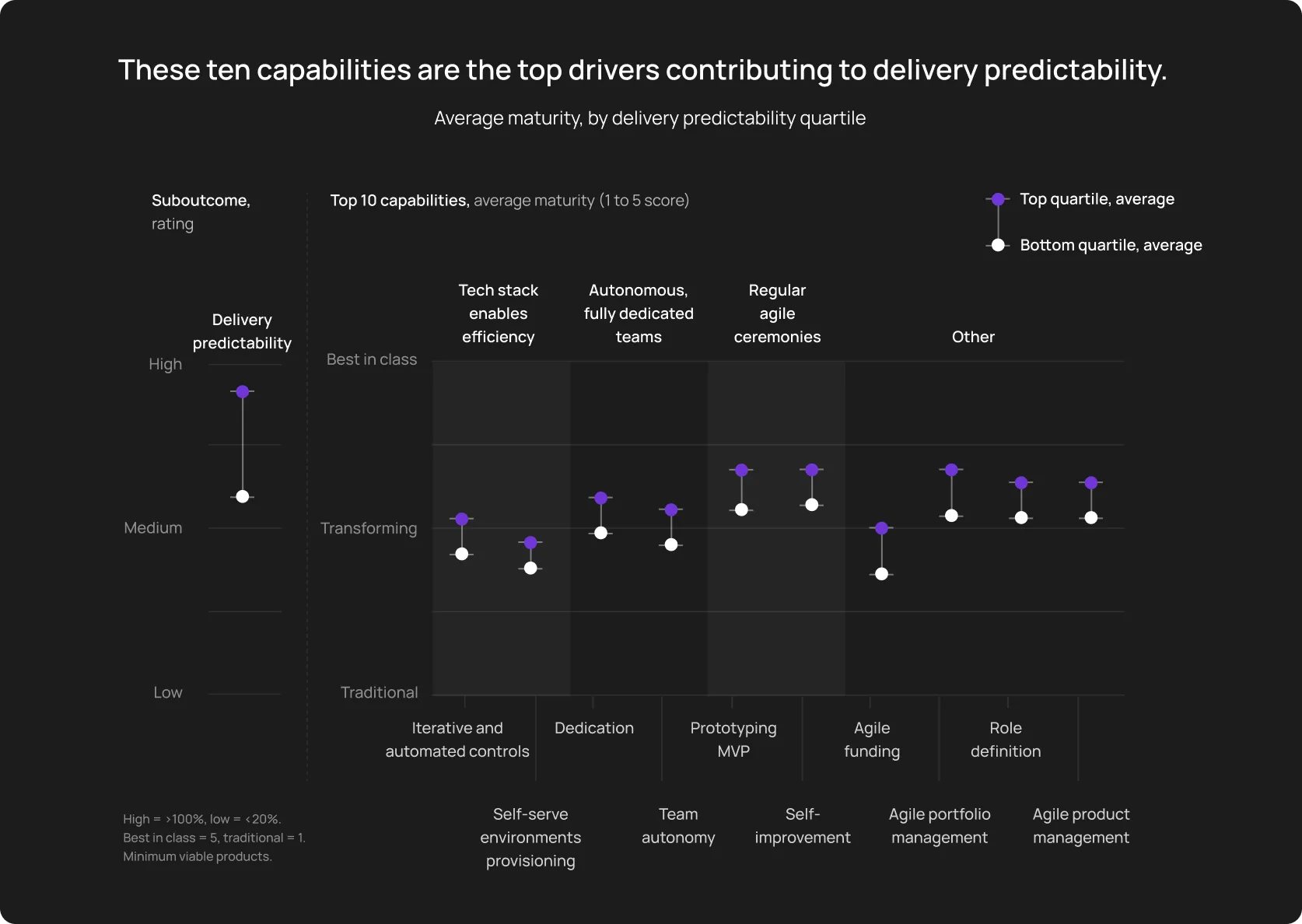
- Maintaining fast feedback cycles: The primary goal of this implementation is speed. When developers receive feedback in minutes rather than days, engineering velocity skyrockets. McKinsey analysis demonstrated that self-improvement and agile ceremonies (which are tightly connected to feedback) are among the top 10 drivers for delivery predictability.
Key challenges of test automation
Feels like a pun, but automation doesn’t run itself. And the most unobvious thing in fine-tuning it isn’t a “how to reach a 100% coverage” issue. Rather, “how to maintain that scale without burning out cash and your team’s energy”.
It’s not easy to achieve 100% coverage, but maintaining the integrity of those tests (true and effective) is what’s actually difficult.
CI/CD testing challenges breakdown
- Maintaining automation scripts: Not that hidden, but is still the heaviest tax in software testing. If a frontend developer restructures a React component and dynamically changes its CSS class names, dozens of legacy test scripts tied to those specific locators will fail. If you have your eyes on rapid scaling, you want to think through a new software testing approach.
- Flaky tests: One of the most common bottlenecks in testing smoothness. Google, Meta, and other giants are fighting them as average SMEs, because we aren’t at the point when a company can eliminate flakiness totally without human QA strategists’ participation.
- Slow test execution: It typically stems from bloated test design, excessive UI-level testing instead of API validation, and a lack of parallel compute infrastructure.
- Growing automation complexity: If the QA team doesn’t strictly enforce architectural standards, the framework quickly turns into unreadable code. New engineers will spend (waste) more time than you expect during their onboarding, trying to interpret that code.
ℹ️ The Bitrise Mobile Insights 2025 report analyzed over 10 million builds and found that the proportion of teams experiencing severe test flakiness grew to 23%. Yet, the most successful teams have cut build time by 28%, exactly through strategy optimization and automation.
The resolution is simple — proper strategy and tooling.
Modern trends in automated testing
Fluctuating macroeconomic pressure in 2026 forces enterprises and most SMEs to prioritize cost efficiency and predictable ROI over unchecked headcount growth. That’s why technology is shifting toward pragmatic, labor-saving solutions rather than purely experimental tech.

AI-assisted testing
Slow but steady, artificial intelligence in QA is heading toward practical application. At the moment, AI is not autonomously writing flawless enterprise architectures, but it is drastically reducing boilerplate workload.
Modern tools now use AI to generate and maintain test cases by analyzing DOM structures and user analytics. More importantly, self-healing algorithms dynamically resolve broken locators at runtime, directly addressing the maintenance tax that drains QA budgets.
Parallel testing
Parallel execution is less a trend than a new standard for teams shipping multiple times per week. Running 600 tests sequentially can take 40 to 90 minutes.
Running those same tests across 10 parallel workers brings that to 5 to 10 minutes, within the window where developers will actually wait for results.
This concurrency allows us to execute massive regression suites inside the CI/CD pipeline on every pull request without blocking developer merges.
Workflow-based testing
There’s a meaningful shift happening in how teams think about what to automate. The older model was like “automate as many test cases as possible, maximize the count”. A more deliberate approach is “automate the user journeys that matter most, and keep those tests stable and fast”.
Smart QA teams align test coverage with revenue-generating flows: user onboarding, complex data exports, or checkout processes. This ensures business continuity, not just technical compliance.
A non-obvious hint is industry-specific scenarios. Here are a couple of nice-to-know considerations:
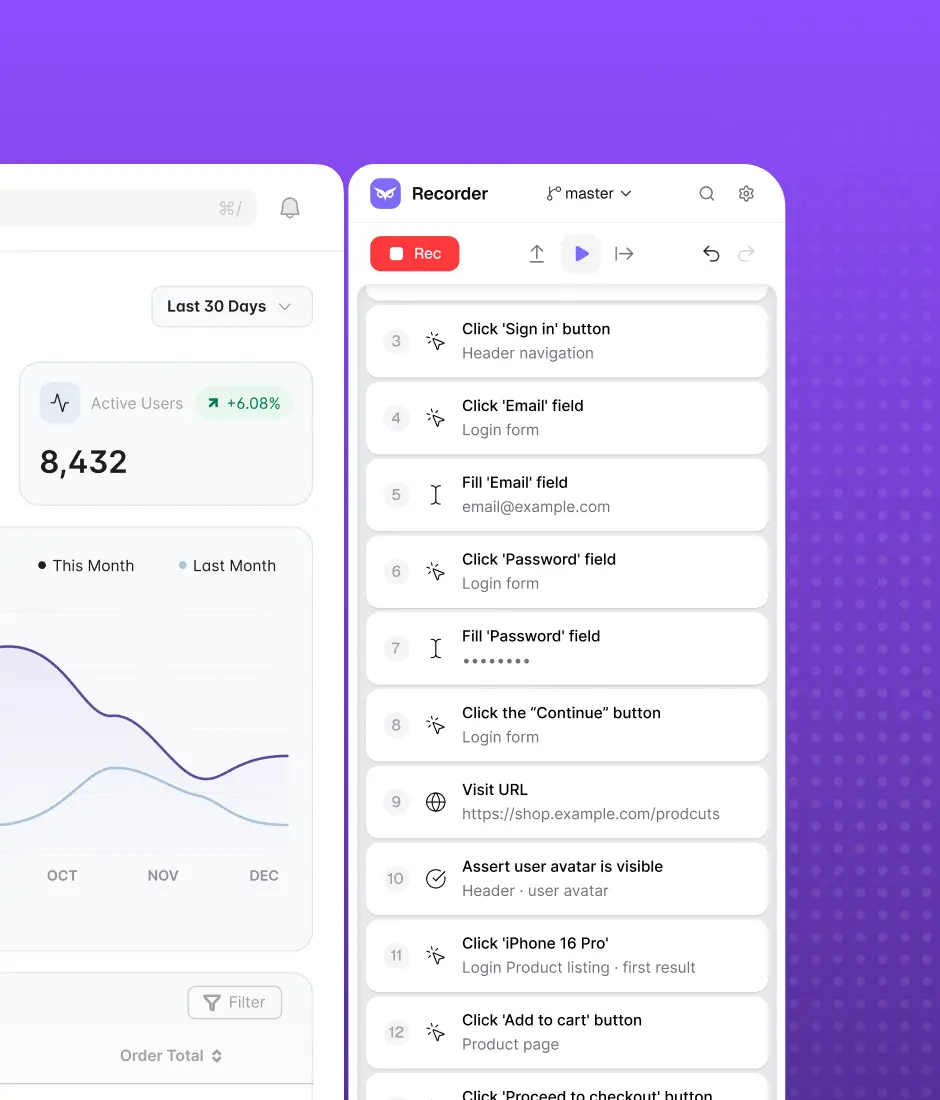
Platforms that support flow recording, like OwlityAI, operationalize this: teams capture real user flows, with all field-related nuances, and cover actual product behavior, passing through all vague interpretations.
Cloud testing infrastructure
Maintaining local device farms and managing internal Selenium grids has become an unjustifiable expense. Cloud testing infrastructure has been the default for the past few years, and is now turning into an irreplaceable prerequisite for scaling.
Another geopolitical and macroeconomic factor worth acknowledging: cloud testing infrastructure concentrates dependency on a small number of infrastructure providers, primarily AWS, Azure, and GCP.
Teams operating in regulated industries, or in jurisdictions with data residency requirements, need to evaluate where test execution actually runs and what data passes through that infrastructure.
The trend toward cloud-first test execution is real and well-founded, but it isn’t cost-free from a compliance perspective.
Best practices for successful test automation
Perhaps the best advice here is to separate a startup’s “use what’s there, fix it in motion” approach from strategizing crucial business functions like software testing.
Test strategy isn’t an afterthought; at least, it shouldn’t be. ROI will likely be higher when approaching test automation as a first-class software project and integrate it directly into your overall quality strategy.
Like this.
Prioritize critical workflows
Trying to automate everything increases the chance of overbudgeting and team burnout. Obvious, yet still dangerous.
Start with the revenue-generating flows:
- Authentication and session management
- Core transactional flows (purchase, signup, activation)
- Any flow where a failure causes revenue loss or support escalation
Automate these, keep them stable, and treat them as the bare minimum.
Make independent tests a standard
Every test should set up its own preconditions, execute, assert, and clean up after itself, without relying on another test having run first.
The fix: Set up test data via API or direct database seeding at the start of each test, and tear it down afterward. It adds a few lines per test, but saves hours of debugging.
Maintain a clear automation structure
New engineers can’t contribute without a long ramp-up. Shared utilities get extended without refactoring. The same flow gets tested from three different entry points by three different engineers who didn’t know the others existed.
That was an unscalable structure.
Here’s a structure that scales:
Governance:
- Assign ownership by module or feature area
- Review test additions the same way you review application code
- Circle up with a monthly audit: retire tests for deprecated functionality, flag tests that haven’t passed cleanly in 30 days
Combine developer testing with QA expertise
Use different failure modes with developer-written tests and QA-designed tests. Using them simultaneously makes the test automation strategy cohesive.
Integrate automation into the release process
Background testing is the ideal option for startups and fast-paced SMEs. It’s a bit blasphemous to say something like “do good, but don’t do bad,” don’t you think? Anyway, we should repeat — testing needs to be wired into the release process with defined consequences.
A pipeline structure:
- On every commit: unit and integration tests (est. time is ~ 5 minutes)
- On merge to main: full test suite including E2E (must pass to deploy to staging)
- Before production: smoke test suite (must pass to deploy; covers 20 to 30 critical path scenarios)
- Nightly: full regression against production with synthetic accounts (review results during the daily standup)
How modern automation platforms simplify test automation
It’s similar to building a second software product:
- You build a framework that will work “on the background” (not totally, but still, will demand less of your attention)
- You rearchitect CI/CD infrastructure to free your engineers from continuously rewriting brittle locators
- You optimize expensive cloud nodes for the scale test execution
Modern software testing platforms ease off the technical debt by taking over the infrastructure and maintenance.
Teams record critical user flows directly in the browser → the platform converts the recordings into automated tests.
As your application grows, you bypass server provisioning because test execution happens concurrently in the Owlity cloud.
Self-healing allows adapting to UI changes and eliminates manual script maintenance.
Wrapping up, we are not at the moment where AI does everything for us yet.
But we see it as a principally new approach to ensuring software quality — built-in smart algorithms and human QA expertise, which allows expanding test coverage across multiple datasets, production-grade automation without the massive financial overhead, and refocusing on really impactful business areas.
Monthly testing & QA content in your inbox
Get the latest product updates, news, and customer stories delivered directly to your inbox