

Mapping test dependencies using AI. A practical engineering guide

Dmitry Reznik
Chief Product Officer

Summarize with:
Have you heard about test dependencies? Of course, you did.
If it were up to us, we would include them in J.K. Rowling’s book about fantastic beasts: we really want all testers to know where exactly to find them.
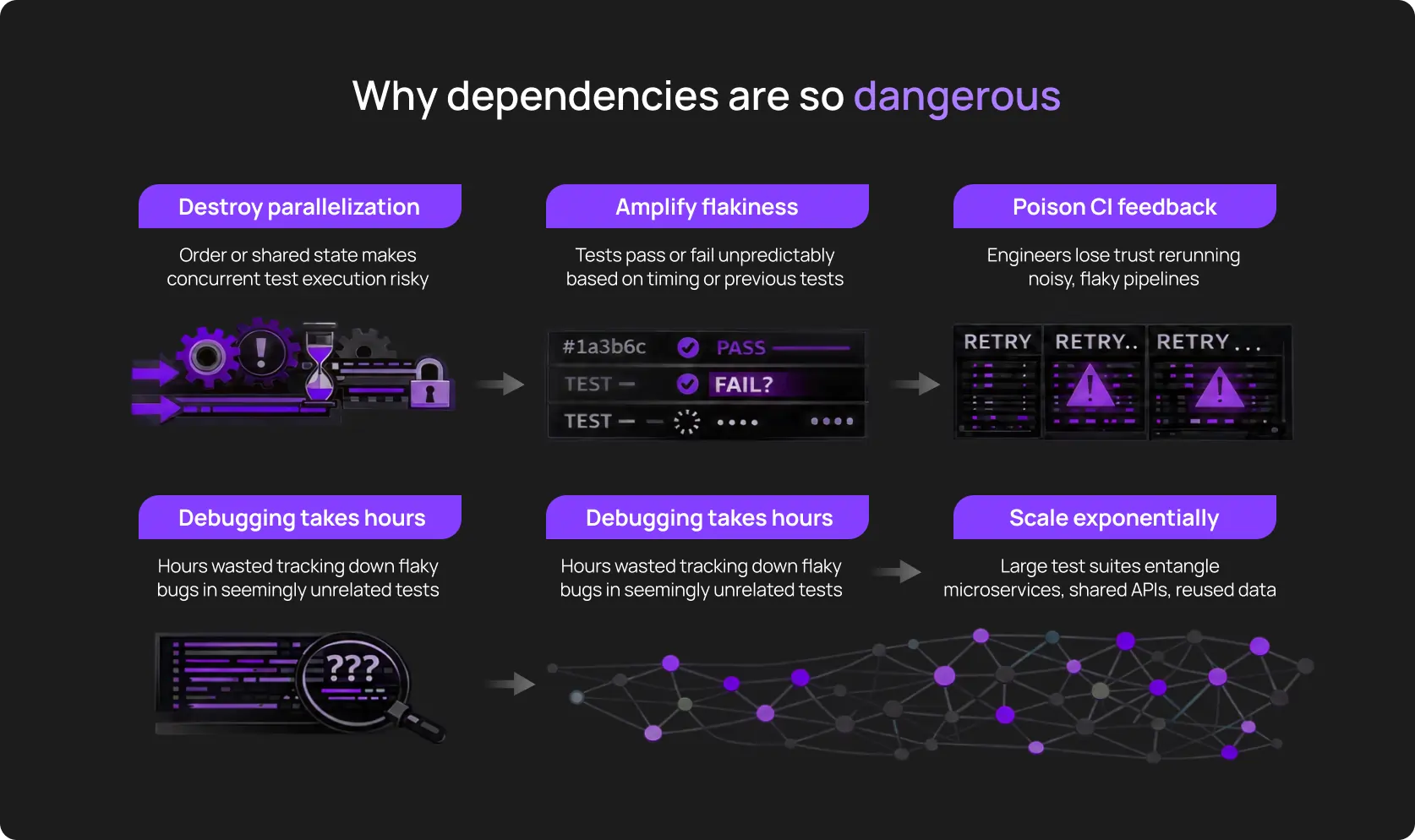
Because they hide from obvious relations, and tests share database rows, rely on the same user sessions, and have identical API rate limits. A deployment breaks tests that never touched the changed code.
The CI/CD flakiness rate increases from 2% to 15% in just three months, and one cozy Friday, during the release at 11 PM, the pipeline suddenly turns red.
This is a common problem of large enterprises or intricate legacy code. One empirical study of large-scale test suites from GitHub revealed that order dependency caused 59% of all flaky tests within the selection.
Many flaky tests are not flaky in isolation at all, but they are order-dependent, state-dependent, or coupled to previous executions. Once the test order changes or execution is parallelized, failures happen, and that is nearly impossible to diagnose manually.
AI changes this: it analyzes execution logs, state transitions, and API call sequences and finds failure correlation patterns.
What would take a team weeks to trace manually, AI surfaces with statistical confidence scores and root cause attribution.
This guide breaks down mapping test dependencies using AI and how to use this in practice.
What are test dependencies, and why do they cause so much instability?
We don’t usually think about any part of the body separately until it hurts. Once healthy, the pipeline now can’t run because we didn’t test another “something” first.
What can be that “something”: unstable tests and other surprises
- Shared environment state: A database row left dirty, a Redis cache key that wasn’t flushed, or a browser local storage entry persisting between specs.
- The outcome of another test: Test B only passes if Test A has a database record.
- Execution order: Test B only passes if Test A ran five seconds ago and warmed up the JVM or the API gateway cache.
- Data residue: One test creates a user with email test@example.com, and a later test fails because it tries to register that same email.
- Session continuity: A UI test implicitly relying on a login cookie set by a previous API test.
- System configuration: A feature flag set by one test affects whether another test’s API endpoint even exists.
Real-world dependencies look like this
You can distinguish them by how frequently they pop up. Namely, in practice:
- “Zombie data” failure: verify_user_deletion fails because create_user ran first but crashed before the cleanup step. Now the database contains a record that shouldn’t be there, and the next run will go down with a duplicate key error.
- “Lucky” pass: test_dashboard_load passes, but only because test_login_flow happened to run immediately before it and left a valid JWT in the browser headers. If you run test_dashboard_load in isolation, it will fail.
- Cache collision: A backend API test modifies a global configuration setting (like feature flags) but forgets to reset it. Next, a UI test fails because the frontend is rendering based on that stale flag.
Why this destroys engineering velocity
Because it creates chaos from what should be a clear and predictable process.
Why manual dependency mapping doesn’t work anymore
A decade ago – give or take – monolithic applications had a single relational database and a stable 200-test Selenium suite. You could keep the dependency map literally in your head: Test_05 created the user for Test_06, and this was explicit.
Take that modern test suites have dependencies is true, but it’s incomplete. They have dependency networks.
A mid-sized SaaS company running 8,000 automated tests across 25 microservices, and each test potentially interacts with every other test in the suite. Totally, it’s 31,996,000 possible pairings.
The reality engineering teams are dealing with
A few years ago, a senior QA could still “keep the dependency map in their head”.
But today’s environments involve:
- Dozens (hundreds?) of user flows crossing multiple services
- Frequent UI and backend changes that subtly alter behavior
- Async processing, queues, caches, and background jobs
- Frontend frameworks that re-render and rehydrate state dynamically
- Regression suites with 100+ tests
- Little to no up-to-date documentation explaining why things work the way they do
Basically, it’s the black box problem, and several confused QA engineers are forced to deal with it. Humans looking at the UI test code will never see the mentioned dependency as it lives in the infrastructure, way deeper than QA’s zone of responsibility.
Why engineers can’t manually track test dependencies
You didn’t plan gigabytes of execution logs from the outset, did you? Over the years, they have evolved and now have intricate dependencies with significant and subtle correlations across distributed systems.
Dependency graph testing helps, but only for clarification. In turn, execution is challenging:
- Execution patterns: A dependency might only trigger a failure 1% of the time, specifically when the test runner’s sharding logic places Test_A and Test_Z on the same node in reverse order. Humans see “random flake” and don't see the specific execution permutation that caused it.
- Environmental variations: Tests pass on the developer’s Mac with 32GB RAM and fail on CI runners with 4GB because memory pressure alters caching behavior. Tests pass in us-east-1 with 5ms database latency, but fail in eu-west-1 with 45ms latency (timing assumptions break).
- API behaviors: A test might make a seemingly harmless GET request that, due to a backend bug or caching strategy, locks a resource. Without inspecting the full HTTP trace of every single run, these “read-only” dependencies remain invisible.
- Test-to-test interactions: To find a polluter manually, you have to bisect the suite. Let’s say it takes 40 minutes to run, so you need 10 bisection steps. Equals an entire day of lost productivity.
How AI maps test dependencies inside real applications
It’s commonly known that artificial intelligence is way better than humans in parsing large data sets. Even though it doesn’t comprehend dependencies the way humans do, it has a helicopter view of users’ behavior and sees what we can’t.
1. Pattern recognition
You have thousands of runs, history logs, and, in some cases, even legacy review or something like a retro. Anyway, AI test analysis is a deep dive into all the data you have, the logical conclusions, and following predictions.
Over time, it understands “incompatibility” of tests, contradictory “compatibility” (when tests “recover” together), and when this is a specific execution order that breaks everything at once.
2. Data flow analysis
The AI-powered end-to-end tool spots which tests generate new data and which tests use that data later on, and predicts potential errors.
What it monitors:
- Data created by (conditional) Test A during execution
- Which subsequent tests query or modify those same records
- Moments when different tests use the same email to create two users
- State transitions that violate the app’s logic (a cart marked “checked out” gets items added to it)
Example:
Your checkout test outputs the status “user not found”. AI examines the execution path:
- Test #10 created user test@owlity.ai at {{TIME}}
- Test #12 (your checkout test) attempted to use that user at {{TIME +2}}
- Test #11 ran cleanup that deleted all test users at {{TIME +1}}
What we actually see: Test #12 depends on Test #10’s data surviving past Test #11’s cleanup. AI spots this, provides timestamps and data IDs.
3. Uncovering API-level dependency
Alongside authentication tokens, modern testing tools watch the following in the background:
- Proper order: API endpoint X → endpoint Y returns valid data, not vice versa
- If the response from /api/cart/create includes an ID that /api/checkout expects
- Backend services that cache responses
- Rate limiting that causes Test 10 failure because Tests 1,2,3, and 4 exhausted the quota
In this case, AI maps a cache layer that gets populated by one test and causes a false positive speed-up in the next.
4. UI flow modeling
Dependency graph testing helps to get a more comprehensive picture. Let’s break this down on the example with the user state during the payment flow.
How AI recognizes flow chains (variables):
- Test clicks “Proceed to payment” → button doesn’t exist → AI checks prior actions → discovers the test never added items to cart → flags missing dependency on cart population step.
- Test expects to see admin panel → gets redirected to login → AI traces session state → finds the authentication test that should have run first didn’t execute in this particular CI run due to a test filter configuration.
5. Environment and infrastructure correlation
Interestingly, dependencies leave a trail outside the code, too.
Size up failures against infrastructure signals. And AI does the same thing with painful ease (and at a drastic scale): it spots a subtle pattern that a suite of 50 tests fails only when running on “Container Type B”.
This is a dependency on infrastructure warmth or specific environment variables.
6. Drift detection across versions
One of the most common reasons why so many teams have CI/CD flakiness is that dependencies aren’t static.
And the modern tools track every new coupling tied to a specific release; they notice when old couplings disappear, and when refactoring changes execution assumptions.
The types of dependencies AI effortlessly finds
It seems obvious — document dependencies and everyone in the tech team will be happy.
But in reality, teams usually discover them when something breaks. Uber Engineering has had thousands of microservices and a million-line repo, which made manual dependency tracking impossible.
They built an internal system, Testopedia, to analyze previous test data. They ran through that massive amount and moved from random flakiness to conscious mapping of test dependencies and root causes.
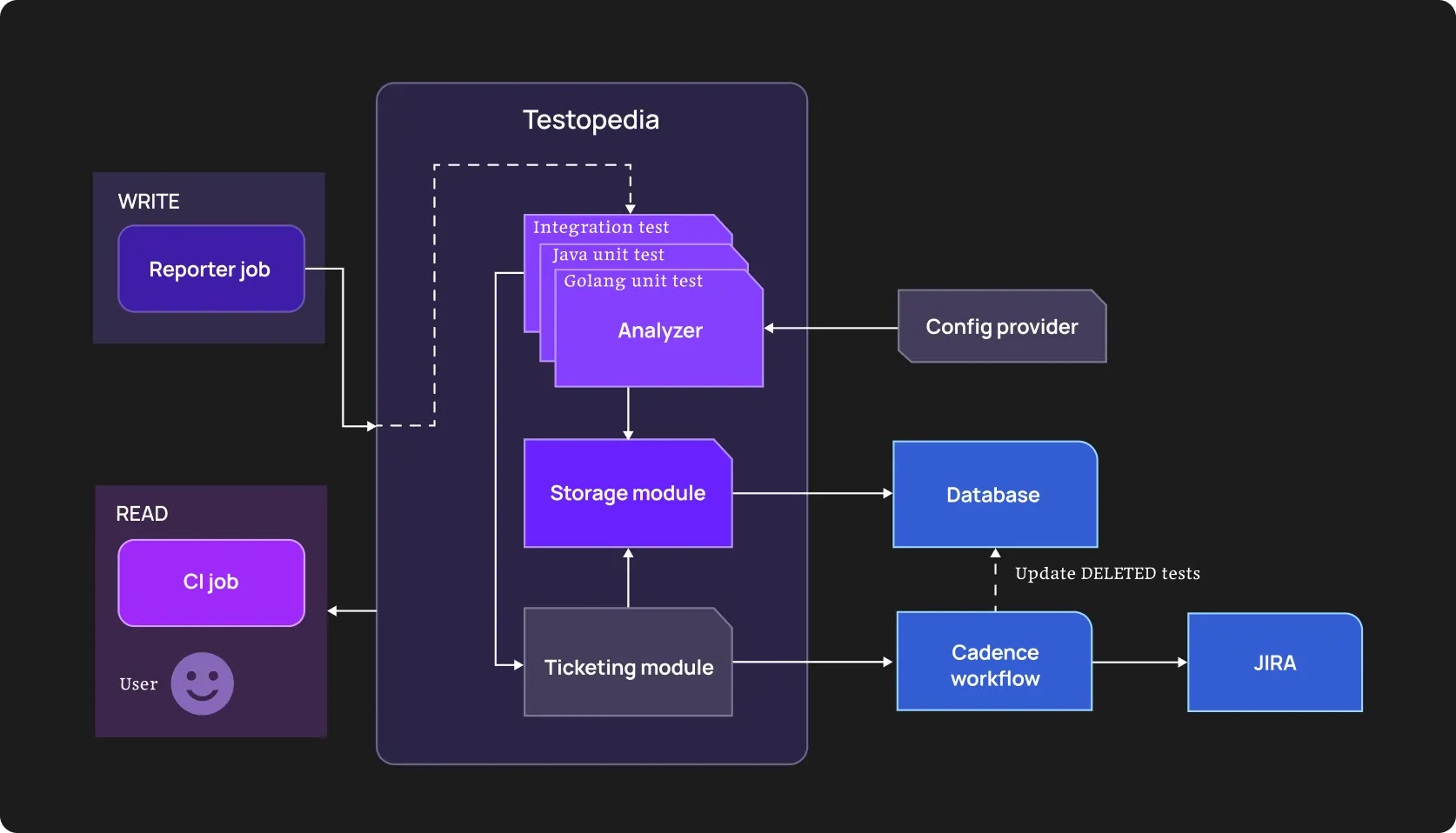
This shallow example shows the current AI’s role in software testing: it reveals flaky tests and navigates you through refactoring with clear couplings specified.
State dependencies
This is the most common and destructive dependency:
Test A creates a user account and sets preferences.newsletter = true. Test B validates email sending logic and assumes newsletter preferences exist. Test B doesn’t create its own user, it “parasitizes” on Test A’s setup. If Test A doesn’t run, or just fails after running, Test B fails with “preference not found”.
AI detects that Test B only fails when running after Test A on the same worker node, but passes when running on a fresh container.
Data dependencies
Tests share IDs, tokens, sessions, feature flags, configuration values, which can pass on devs’ laptops and fail in CI.
AI tracks literal values across test executions: user_id: 12345 appears in four different test files, so AI correlates their execution patterns and flags that all four tests compete for the same resource.
It also calculates conflict probability; like, if these tests run simultaneously, there’s a 29% chance of a crash.
Order dependencies
Tests only pass when executed in a specific sequence. Without sugarcoating: it may happen when a developer carelessly (or, wisely?) relies on Test A to perform a login or configuration step that Test B continuously uses.
AI analyzes failure patterns across randomized test runs. Let’s say Test X passes when run after Test Y and fails when run before Test Y. This pattern holds across 100+ executions. Obviously, there’s an order dependency. AI flags it with probabilistic scores: “Execute Test Y first to execute Test X then: 95% dependency”.
Parallel execution turns chaotic sequence dependency into constant failures.
Environment dependencies
The same test behaves differently in different CI agents, containers, or even at different times of day.
RAM size, a container type, latency, and other environmental factors impact test passing significantly.
AI test analysis connects failure to these factors.
API-level dependencies
Test A triggers an asynchronous background job (e.g., "Generate Report"). The test finishes and passes. However, the background job is still running and locks a database row. Test B starts, tries to write to that row, and hits a timeout.
Tests can trigger background processes, and sometimes not right after their own start, but without direct correlation with time.
Example: The test passes, the process is finished. Yet, the report generation is still running and locks a database row. The next test starts, tries to write to that row, and can’t.
UI conditional dependencies
Multi-step flows depend on prerequisite screens, permissions, or prior navigation that tests assume.
A test might assume the browser is already on the dashboard because the previous test left it there. If the previous test crashed or the browser session reset, the current test fails to find the Settings button.
AI analyzes DOM snapshots at the start of a test and flags inconsistencies in the starting state, comparing successful and failed runs.
Performance or timing dependencies
Tests rely on certain timeframes to understand that a specific operation is complete. When they don’t get such a signal after this time period, other tests can fail as well.
The next tests run and encounter a partial state: a database record exists but isn’t marked complete, a background job is still processing, a cache entry is being written.
A practical engineering workflow for mapping dependencies using AI
The goal of the guide below is to tie abstract flakiness to triggers and tangible actions. Note that we assume you are using AI-powered testing tools, like OwlityAI or a custom LLM-based analyzer.
Step 1. Structure historical logs and analyze them
Running new tests may not be the best option to start with. Feed your autonomous testing tool the last 500 CI/CD build reports in JSON or XML format.
Include the last 1000 execution results, timestamps and duration tied to runner IDs, container images, or regions, and API calls, alongside cache operations during test execution.
This “knowledge base” for your testing tool will serve as the new normal. And it will guide AI when inferring business purpose or logical action.
Step 2. Identify unstable tests with shared patterns
The easiest way to group tests that didn’t pass is by the message the tool displays after each failure. However, it’s not always the best option. Modern testing tools group by stack trace similarity and timing proximity.
This way, you get a list of tests that have a common failure pattern: “before sth”, “after sth”, “with (an)other test(s)”, etc.
Step 3. Group tests into dependency clusters
It is a stage where we draw a dependency graph. Testing process becomes visual: nodes are tests, and edges are coupling strength.
If Test 1 and Test 2 share a dependency on the same microservice and fail during the same deployment windows, they will be clustered together.
Step 4. Identify where parallelization is blocked
An autonomous tool can identify slow tests that must run sequentially because other tests depend on their output.
As well as:
- Bottleneck clusters: A 200-test cluster that shares one rate-limited external API and parallelizing them causes 429 errors
- Long-pole tests: Separate tests that take much more time than most other tests. The tool blocks runner availability even when other tests could run in parallel
If you decouple badly connected tests from the shared database seeding step, you can execute another n tests simultaneously and, this way, reduce suite time by X minutes. So, you save time, resources, and hence, money.
Step 5. Diff root causes
This helps to compare the logs of a passing run vs a failing run across environments and draws a comprehensive picture of the project’s health.
You’ll get a similar list:
- shared environment state
- shared or reused data
- timing and async behavior
- conditional UI or API flows
Pay attention to what the delta AI tool shows you:
- In the failing run, the POST /login call took 400ms longer
- In the failing run, the database connection pool was at 95% capacity at the start of the test
Basically, the tool answers why — why a specific test is flaky, why it’s stable, etc.
Step 6. Fix
Now, you have the map, so it’s time for us to engineer:
- Isolate data: AI has suggested injecting unique IDs (UUID) into every test entity instead of static strings. A good one.
- Implement “AfterEach” hooks: This cleans up state and resets the environment regardless of pass/fail status.
- Mock external state: If an API dependency is causing timing flakes, replace the live call with a deterministic mock for that specific test cluster.
This way, we’re decoupling flows and making async behavior explicit.
Step 7. Validate improvements in CI
Deploy the decoupled tests and let the engine monitor the Stability Score — there should be a reduction in false positives. A successful refactor means the tests can now be shuffled without failure.
Engineering metrics that improve after dependency mapping
Speaking numbers is the best way to prove your decision to implement novelty was right. To avoid mimicking impact, here are some real engineering metrics that will guide you on leadership meetings.
- Time savings through parallelization. Tests no longer wait on invisible preconditions, and suites that previously ran in strict sequence can safely fan out.
- Prevention of failure cascading. Even just one broken test can spoil the remaining chain. Autonomous test maintenance solves this problem.
- Regression cycles shorten with fewer re-runs. The same coverage fits into smaller time windows. Quite logically, you also need fewer maintenance hours.
- CI becomes predictable and more stable. No more “it passes on my machine” talks, no more “I don’t have enough expertise” — OwlityAI and many modern testing tools don’t require extensive QA experience.
- MTTR improves. The tool ties failures point to a specific dependency break, so the problem is almost always clear. Engineers precisely know what to debug.
- Increase in test stability score. Dependency-driven variance is removed from execution paths.
Who benefits most from AI-powered dependency mapping
- Teams with >5% of flakiness in their CI pipelines:
Developers shouldn’t restart the build three times, expecting it passes without proper changes after previous failures.
- Organizations with 1,000-test and larger regression suites:
Manual dependency graphing is difficult with 1,000-test suites. With even larger ones (let’s say 5,000 tests), you have 12.5 million potential pairwise interactions.
Even if only 0.1% are actual dependencies, that’s 12,500 couplings to track. Pardon for the pathos, but — AI-powered testing tools are the way. At least, it’s the only practical approach.
Because of parallelization and holisticness (we remember about documentation, don’t we?).
- Apps with many microservices:
Such architectures are “dependized” a priori. Without a deep awareness of any change across all modules, you won’t catch the real problem once it happens.
- Legacy systems:
It’s not always obvious, but you should also take into account attrition. When the initial authors of your suites are gone, nobody properly knows why Test_101 must run before Test_102.
Of course, it depends on culture and documenting discipline, but it’s a common situation.
- Complex frontends with dynamic user flows:
Modern Single Page Applications maintain:
- Client-side state machines
- Caches, local storage
- Session continuity across navigation
Tests interact with all of this. One test’s state change affects the conditions of the next one. Redux stores persist. GraphQL caches carry over. WebSocket connections remain open.
Chances are, you won’t notice this in test code. AI detects such dependencies by dependency graph testing at scale.
- Multi-tenant SaaS environments:
Tests sharing the same tenant or organization ID will constantly collide on data. Modern testing tools identify such points and recommend actionable strategies.
When dependency mapping won’t solve problems
There are no ideal instruments in software testing. Artificial intelligence isn’t an exception. Let’s run through common scenarios where mapping dependencies won’t help your testing Titanic avoid sinking.
Unstable CI environments
If the network consistently disconnects (or another environment problem persists), catching test dependencies won’t help.
Despite AWS notes that <5% of spot instances are interrupted, during long-running test jobs (like machine learning model training or batch processing), the entire job may fail without proper checkpointing and require a complete restart.
No consistent test data strategy
If your database is refreshed with random production dumps, tests will fail regardless of dependencies. It’s better to have a predictable data baseline, proper internal knowledge transfer, and specific protocols.
Extremely immature test suites
If your test suite is:
- Under 100 tests total
- Has no CI integration
- Runs only on developer laptops
- Consists primarily of manual test scripts converted to automation without refactoring
- Shows at least 40% failure rate on the main branch
You are not ready for mapping test dependencies. Focus on basic test hygiene: get tests passing consistently, establish CI, reach 90%+ stability.
How OwlityAI automatically maps and stabilizes test dependencies
In a nutshell, OwlityAI has a smart and properly trained algorithm under the hood, which allows it to “understand” your business logic and connect AI test analysis to execution behavior and desired software performance.
- OwilityAI clusters tests based on how they behave together across runs, environments, and releases
- It identifies test-to-test coupling and traces shared data and state transitions
- It maps data flow through UI and API layers
- OwlityAI detects drift when dependencies appear, disappear, or are impacted by changes
- Correlates flakiness patterns to specific dependency breaks
- Can recommend specific actionable strategies based on your specific case
Eventually, it helps to reach stable, scalable, predictable test suites regardless of your size and previous experience with AI automation testing tools.
Bottom line
Without long-winded lyrics — when you don’t understand why specific tests consistently fail and break your entire pipeline, it’s likely a hidden dependency.
It’s challenging to uncover it at scale. That’s why it’s a good idea to use AI for test reliability.
- Comprehensive analysis
- Current behavior memorizing
- Understanding internal logic, connections, and dependencies
- Generating end-to-end scenarios and suites
Autonomous running and test maintenance – frees several hours a week for your tech team, but not “set it and forget it”.
If you are ready to get the most out of the modern approach to software testing, we are happy to help.
Monthly testing & QA content in your inbox
Get the latest product updates, news, and customer stories delivered directly to your inbox