

Why most AI QA initiatives fail in year one, and how to avoid the trap

Dmitry Reznik
Chief Product Officer

Summarize with:
Companies get very different results in AI adoption — and as of 2026, the lion’s share doesn’t reach measurable outcomes in their first year.
In 2024, Gartner predicted that at least 30% of generative AI projects would be abandoned by the end of 2025 after proof of concept due to unclear business value.
Even though 15.8% reported a revenue increase, 15.2% — cost savings, and 22.6% stated productivity improvement, the early adopters wouldn’t get far enough over slower competitors.
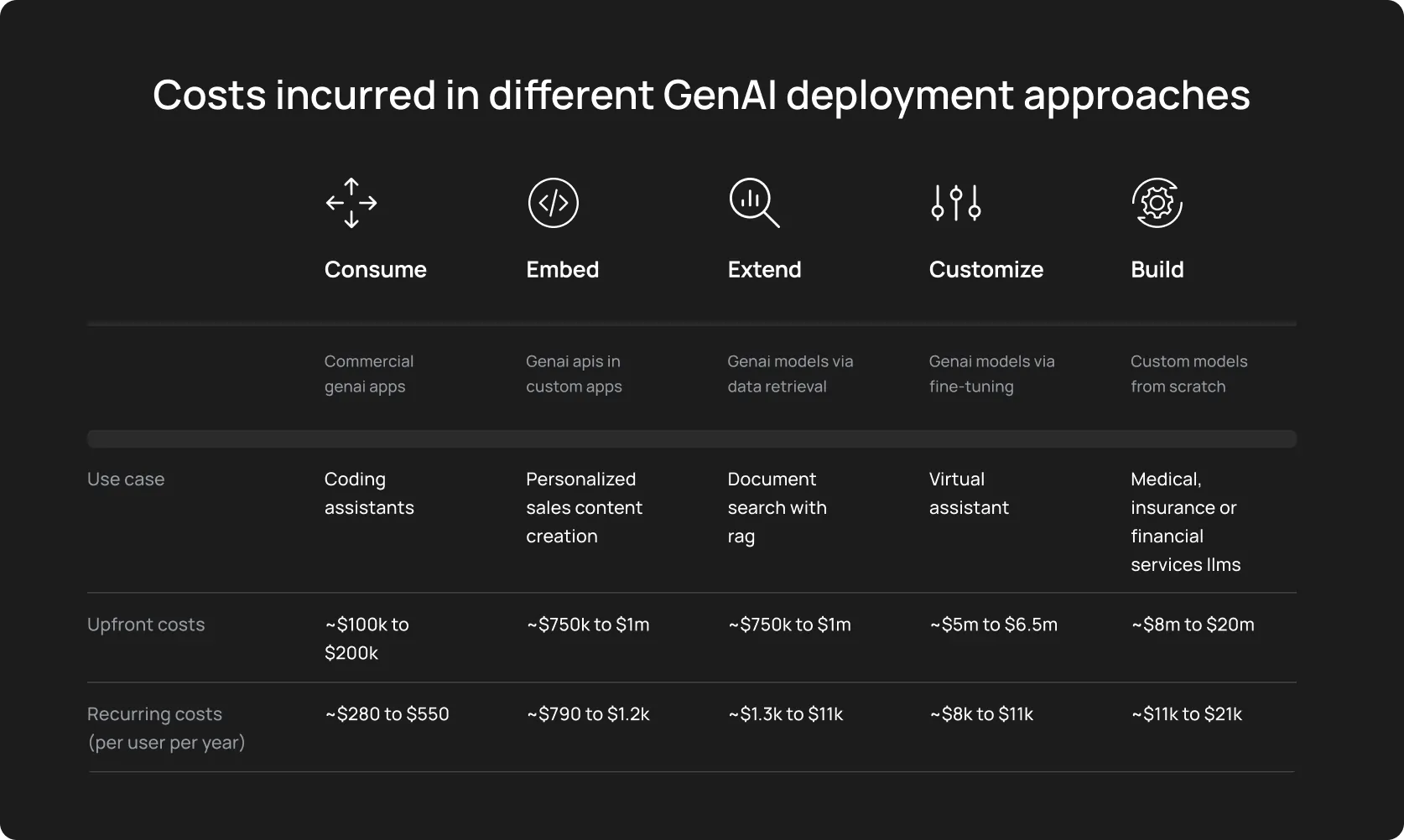
And guess what. MIT and ComplexDiscovery conducted research in 2025 and found that 95% of GenAI pilot programs fail to deliver measurable value.
AI QA initiatives fail the same way. Enthusiastic planning, back-of-the-napkin execution, unclear success criteria — and after 6-12 months, the team feels stuck.
They may have flashy demos or promising PoCs, but they didn’t take into account AI testing pitfalls and didn’t do their homework at all.
The worst is that many teams blame such failures on the tools, but will be fair to say that it is not the tool, it’s an approach to AI-driven QA rollout.
This guide explains why most autonomous testing initiatives fail in year one, and how to avoid the trap.
Most AI QA failures have nothing to do with the tools
It might sound like we’re justifying vendors, but it’s true: when a costly AI implementation falls flat, everyone blames the vendor.
- Unclear interface
- Too weak functionality under the perfect wrap
- Slow-on-the-uptake support
You’ll likely hear similar raps.
Yet, in 2026, it sounds like excuses for poor management. There is no perfect tool, but we already see that the technology actually works:
- Computer vision allows the machine to “see”: The modern tool can distinguish and interact with <canvas> graphs, Shadow DOM components, or embedded iframes.
- Predictive testing: Instead of running a 5-hour regression suite for every commit, modern tools analyze the code dependency graph and execute only the specific 5% of tests relevant to that change.
- Sorting up the roots: Using Natural Language Processing (NLP) on stack traces, an AI testing tool clusters 1,000 failed tests into three distinct buckets (as an example: API 503 Error, Timeout, Visual Regression).
- Synthetic data generation: Almost any AI model needs robust and structured data for adequate learning. Yet, it can also generate complex, GDPR-compliant datasets itself. And what’s impressive — with referential integrity: User with valid Orders and Invoices, etc. This way, you round out the cycle, but note that real-world data still has a leg up over a synthetic one.
As you see, autonomous testing issues rarely stem from the tool’s inability, they stem from an organizational inability:
- Expectations are misaligned: Teams expect immediate ROI or push-button automation.
- Processes remain unchanged: Teams implement AI, but are not using it to the fullest, neither its analytical insights nor its advanced features.
- Ownership is unclear: No one is accountable for interpreting AI output or making quality decisions.
- Readiness is low: Immature teams have unstable environments, poor observability, or inconsistent CI runs.
Failures happen because teams attempt to shoehorn probabilistic AI agents into deterministic legacy processes. Despite the Junior specialist comparisons, AI is not a “faster human”. At least, its strongest capabilities lie beyond just speed.
The main reasons AI QA fails in the first year
Any stopped implementation has much deeper reasons than just tech illiteracy: they are rarely software bugs or a cluttered tool’s interface, and more likely it’s a strategy issue.
So, what causes AI test automation challenges — here are the top eight things.
1. No clear goal or success criteria
When you anchor your AI initiative on the tool instead of the problem, chances are that you’ll find the solution… to the wrong problem.
Does your team raise similar propositions when discussing automation:
- “Let’s try AI”
- “These tasks are corny, let’s automate more”
- “Let’s reduce recurring routine”
Where the trap is: Without a specific goal and defined metrics, success is subjective. One engineer might be impressed that OwlityAI just generated a test, while the manager is disappointed that it didn’t ensure an absolutely bug-free product.
How to avoid: Define binary success criteria beforehand. Something like “OwlityAI must level up the 'Checkout’ smoke suite to >99% pass rate”, or “It must reduce locator maintenance time by 50% within Q1”. Classic SMART/SMARTER framework.
2. Wrong expectations: treating AI like magic
It’s not a spell. Human-level understanding will likely hit the tech home, but not now. Stakeholders often believe that once the tool is plugged in, it will intuitively understand business logic. It may actually, but only if you are integrating the tool around well-structured data and the RAG technique (for example).
Where the trap is: AI makes mistakes. And it’s your task to convey this softly to the CEO and other leadership so that there won’t be any unmet expectations about an ideal self-reliant tool.
The reality: AI is an accelerator, not a replacement for oversight. It has its game at execution, but has zero intuition.
3. Poor test foundation
We love this metaphor — AI is a multiplier. It emphasizes any characteristic of your system. Chaotic environment? Ok, it will double it.
Where the trap is: The first risk of AI testing is deploying smart systems before decluttering your architecture. Environments with random 503 errors, unversioned microservices, dirty data — these should be your first targets. An AI-powered tool will flag every environment hiccup as a bug, and the team will be snowed under fake alerts.
How to avoid: Fix infrastructure, then implement AI: 80% uptime on average will result in 80% reliability of AI work.
4. No QA ownership or responsible leader
AI-driven QA rollout requires a leader and advocate. Otherwise, an autonomous tool will remain a CTO’s tool thrown over the wall to a QA team.
Where the trap is: If you don’t have a specific pro who leads the AI testing implementation, everyone is responsible. And if everyone is responsible for that, no one is.
How to avoid: Designate a SDET, QA Lead, etc. whose primary KPI is the health of the AI integration. They will tune the AI system’s parameters, review its output, and integrate it into the pipeline properly.
5. Too many tools with different delivery paths
We notice that teams often fragment their workflow: one tool for visual regression, another for API generation, and a third for reporting.
Where the trap is: So many paths and no single space create a so-called context switching tax, when engineers spend more time moving data between dashboards than fixing bugs.
How to avoid: It’s better to have a unified view of the system. An integrated workflow allows the testing tool to correlate a UI failure with a network error, something impossible if they live in separate silos.
6. Over-automation with no strategic thinking
An “automate everything” mindset is a Napoleon complex.
Where the trap is: AI can generate tests massively and on the go. That’s why so many teams let it generate thousands of low-value tests (e.g., checking every footer link on every page). And that’s why their regression suites are so inflated.
How to avoid: You can test the element ≠ you should. Strategic prioritization is even more critical when test generation is cheap.
7. Lack of training for QA teams
Modern tools use NLP, Natural Language Processing. They distinguish the natural language, but it still requires proper orchestration.
Where the trap is: Without a proper understanding of how modern testing tools work, teams can’t validate AI output, they are unsure where they can trust AI and where they can’t, and they don’t know how to check it.
How to avoid: AI supervision is the skill of quickly auditing machine decisions. Learn it and teach your team.
8. Expecting immediate ROI
The most sneaky, probably. Yet, AI adoption typically follows a J-Curve. Performance often dips slightly in the first month as the team learns the tool and the AI learns the app’s baseline patterns.
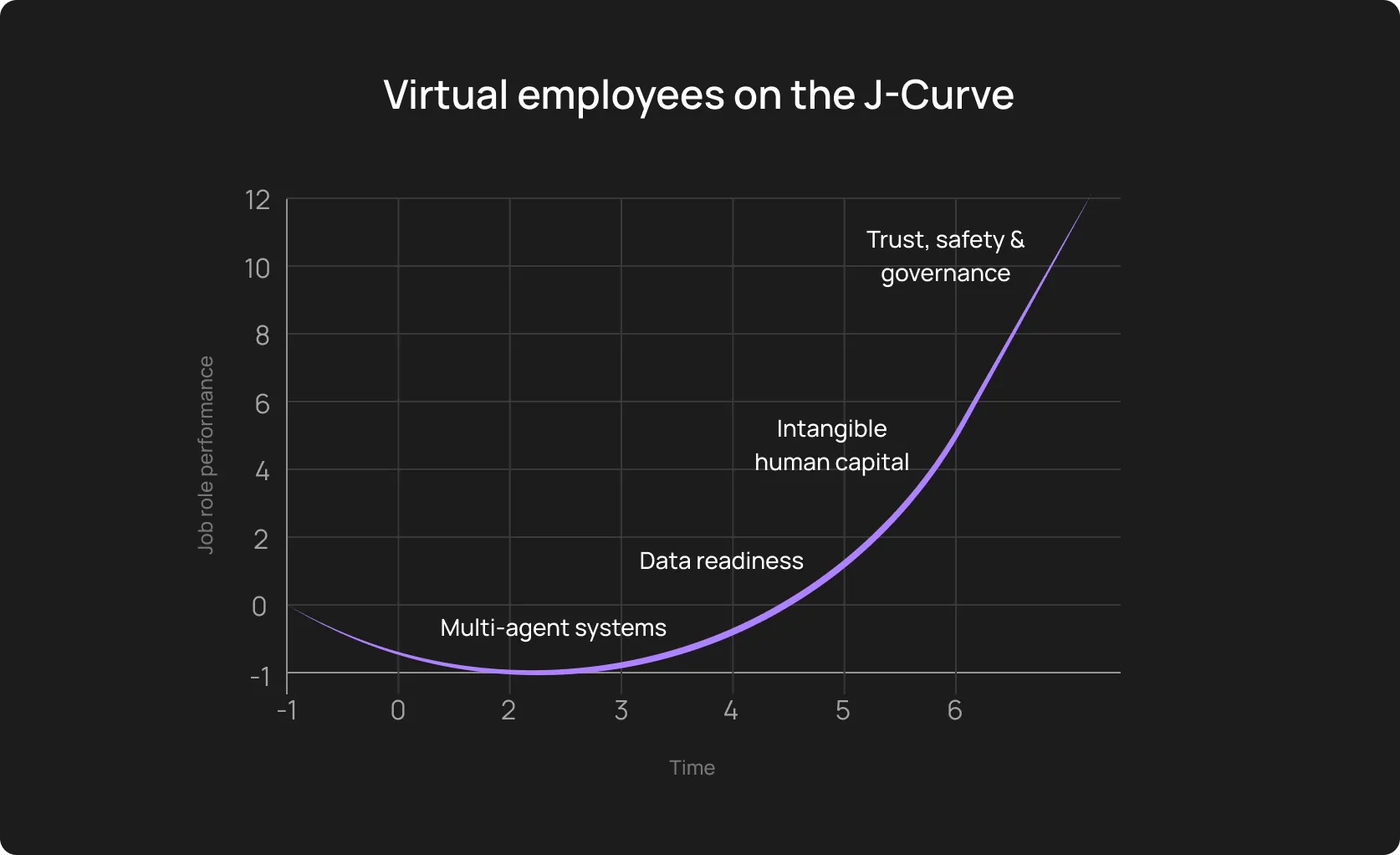
Where the trap is: It’s naive to think that the regression cycle will drop in just one week, and when it doesn’t, leadership pulls the plug.
How to avoid: Stakeholder management is your another full-time job. Clearly explain the scheme: the first 90 days are an investment. Phase 2 is [insert your plan] and will take [X] days. If you don’t explain, you lose trust when the results don’t meet the CEO’s expectations.
The hidden costs of failed AI QA initiatives
It makes sense to view an AI in QA adoption and any other initiative as a vote of confidence: stable (or just quick) wins will work for your credibility, and failures will withdraw money from your next year’s QA budget, allocated by the C-suite. The true cost is the trust gap and an invisible wreckage in your engineering culture:
- The “trust tax” on CI pipelines: When AI-generated tests flake or hallucinate bugs, developers get tired: they treat red builds as noise rather than signals. Once this developer trust is broken, it takes months to rebuild sometimes.
- Skepticism about real automation: A failed high-profile AI pilot reinforces the cynical belief that "automation never works here." Senior engineers who were burned by the chaos will actively resist future modernization efforts, creating a culture of stagnation.
- Lost money in lost opportunities: Beyond the license fees, calculate the Opportunity Cost. If your SDETs spent six months debugging AI-generated scripts instead of building a robust performance framework, you have lost six months of innovation.
Important note: You should be sceptical enough yourself (at least, sometimes). Zillow’s case clearly shows how painful over-relying on algorithms can be. The real estate marketplace lost about USD 300M in just one quarter.
The blueprint to avoid failure and succeed with AI-driven QA rollout
Let’s fix it once again: tool purchase isn’t the first step. Testing audit → establishing needs and goals → building a process → execution.
1. Start with a focused pilot
Boiling the ocean isn’t a good idea, a narrow scope for testing the waters is:
- Critical revenue or compliance flows
- Frequently executed paths
- Scenarios where manual effort is objectively expensive
How to articulate the goal: SMART/SMARTER framework: Reduce maintenance time on the checkout flow by 60% in 1 month without scaling the team.
2. Stabilize the environment first
Before plugging in any AI tool, check if the data is persistent and if microservices are versioned. Also:
- Standardise builds and environments
- Fix known flaky tests
- Ensure deterministic test data
- Improve logging and observability
Rule of thumb: If a test fails manually due to environmental issues, do not let an AI touch it.
3. Define success metrics as early as you can
Better software, smoother testing process, anything similar is not a metric. You need something specific to “defend” the budget and to ensure the team’s success.
We provided a good formulation a bit above, here are two more:
- Achieve a 40% reduction in manual regression hours per sprint
- Increase test coverage of the API layer by 30% without adding a new tester
4. Assign a clear owner
Designate a specific QA Lead or SDET as the AI Owner (call it as you want; within reason, of course).
Responsibilities:
- Review and approve AI-generated tests
- Self-healing validation
- Monitor test stability
- CI integration decisions
Why: There is shared responsibility, but there is no shared ownership.
5. Build human-in-the-loop workflows
Highly effective teams still leave space for human supervision.
The tool generates tests → human tester validates them and (dis)approves → AI runs the suite and heals broken tests → human tester approves healing changes → human tester refines or accepts risk priorities
You may say there are too many “humans” in the process. Here’s a tip for this reason: Configure your tool so that AI suggests a test or a fix, and your teammate just needs to click a button.
This prevents deviations from business logic over time and builds trust because the human is always the final authority.
6. Upskill testers gradually
Don't throw them into the deep end. A phased approach is often way more effective. For example:
Phase 1: Teach the team how AI works and how to read its logs.
Phase 2: Teach them how to prompt the tool for better results.
Phase 3: Teach them how to audit the AI for security and logic gaps.
7. Standardize the process
It may be boring, that’s ok. If it’s broken, that is not ok.
Document:
- How tests are generated
- How approvals work
- How failures are triaged
- How drift is detected
- How coverage expands over time
You should have a description tag, a risk level, and review all AI-generated tests. This creates predictability.
8. Scale AI after the pilot succeeds
This is the final boss of your AI project — scaling:
- Broader flow coverage
- API-level testing
- Full regression automation
- Integration of performance or UX signals
But do not expand the AI to a second microservice until the first one has run green for 10 consecutive builds, because you may scale the noise, too.
What successful AI QA programs have in common
A backlog of hundreds of manual test cases forced Microsoft’s DevOps team to transition to AI-driven automation.
The thing wasn’t their tool/model, it was their approach. They treated the entire AI-driven approach to end-to-end testing as a junior specialist and didn’t leave it be: they built a combined Azure DevOps + Playwright workflow, assigned specific tasks to the model and left humans in the loop at every step.
First, find and learn AI testing mistakes to avoid,and summarize what successful projects have in common.
Effective AI in QA adoption traits
- Clear ownership: One accountable leader accounts for quality outcomes, and the team supports different parts of the process.
- Down-to-earth expectations: Modern technology accelerates routine, but it’s neither a magic pill nor a silver bullet. Testing is just one of the bricks for your project.
- Stable environments: Deterministic builds rely on well-structured data. Ensure this alongside the project’s transparency (open dashboards).
- Clear KPIs: Choose metrics that are relevant to your project. It may be the flakiness rate, cycle time, coverage of critical flows, etc. Look for benchmarks on industry resources, case studies, take consulting, or attract external expertise.
- Step-by-step rollout: Prove stability and effectiveness, and scale after you have quick (yet robust) wins.
- Company-wide communication: All teams within your company, including leadership should have a shared understanding of what AI does.
- Proper tooling integration: Embed the tool into CI/CD to get the most out of it.
Put differently, success is preparation, clear responsibilities and KPIs, incremental moving, and patient communication.
How OwlityAI reduces the risk of AI testing failure
OwlityAI generates tests autonomously but positions them in a “Review queue” by default. You get test suites fast but also safely (humans will review anyway). Additionally:
- Self-healing: Basic AI wrappers rely solely on LLMs. OwlityAI uses computer vision and semantic analysis: if the div ID changed or a developer switched a framework, our tool recognizes the button just like a user would and heals the test accordingly.
- Flakiness detection and stability scoring: OwlityAI assigns a stability score to every test case, automatically quarantining flaky tests so they never block your pipeline.
- Semantic flow understanding: The tool understands the user intent: purchase, adding an item to the cart, etc, and adjusts own actions accordingly.
- Clear CI/CD integration: OwlityAI plugs directly into your existing Jenkins, GitHub Actions, or GitLab pipelines.
- Comprehensive dashboards: You can track coverage gaps, stability, testing progress, and UI drift metrics at a glance.
The icing on the cake is that your team doesn’t need to be a Python expert to use our tool. Its natural language interface allows manual testers and product owners to define complex scenarios in simple words.
Bottom line
Shaky foundation and rush are the main reasons why AI QA fails. This technology is still in its early stages, despite so much proof of advancements and, on the contrary, epic fails.
But AI QA initiatives fail when leaders begin from the wrong end.
So, don’t rush, follow the 8-step blueprint in this article, and book a free 30-min call with OwlityAI experts if you need guidance.
We are always at your disposal, regardless of your business size or testing maturity.
Monthly testing & QA content in your inbox
Get the latest product updates, news, and customer stories delivered directly to your inbox