

How to stop wasting engineering hours on repetitive QA work

Dmitry Reznik
Chief Product Officer

Summarize with:
It’s a common misconception that giants like Google have ideally polished CI/CD pipelines. In reality, in some large repositories, engineers were spending hours every week simply re-running pipelines, arguing over whether a failure was “real”.
Additionally, Atlassian’s 2025 State of Developer Experience report reveals that 41% of software engineers now lose 11+ hours weekly to inefficiencies that have nothing to do with writing new code.
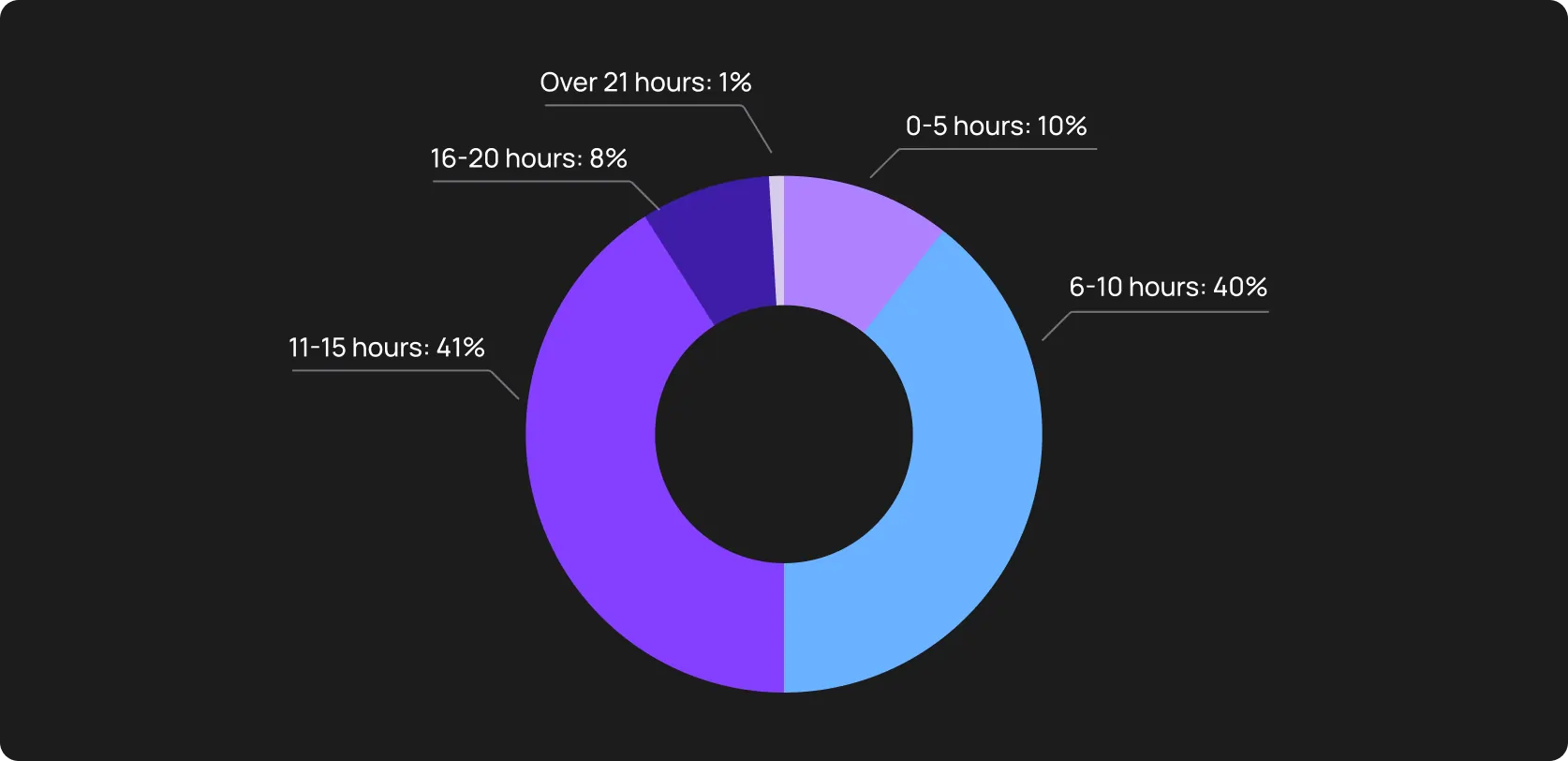
Certainly, they calculated not only testing issues, but we assume a significant share of testing blockers in this survey.
Typical day-to-day samsara:
- Developers pushed a change and waited from 30 to 90 minutes
- QA engineers manually relaunched the same suites because “it’s probably just flaky again”
- SDETs rewrote brittle locators after every UI tweak
- Entire teams replayed the same debugging conversations
You hired these guys to develop, to create, to innovate after all, and they are spending a significant part of their capacity to oversee the flows they created to reduce QA workload.
Below, we explain how to stop wasting engineering hours by combining AI, smarter automation, and better workflows.
The hidden cost of repetitive QA work
Does your budget look clean on paper? Cloud spend is visible, headcount is visible, and tooling contracts as well. We suppose so.
But there is always a but, the maintenance tax — the recurring drain of engineering time spent on work that produces no new value.
You don’t notice it in a single sprint, but it constantly compounds. Here is where this hidden cost accumulates.
Manual test execution during regressions: 100% automation has nothing to do with reality (usually). Before a major release, teams revert to so-called sanity checks, where engineers manually click through critical flows because they don’t fully trust the automated suite. This way, high-value developers become expensive manual testers.
Endless triage of flaky test failures: They say, the most expensive bug is the one that doesn’t exist. Sometimes, false positives waste more working hours of high-cost engineers than any real bugs. If 10% of your CI runs are flaky, you are paying a 10% tax on your entire engineering capacity.
Rewriting locators after every UI update: React, Vue, and other frontends are fluid, and traditional automation just can’t keep up. So instead of improving coverage, SDET spends the sprint rewriting brittle XPath selectors after changing a button class or moving a container.
Debugging tests that fail only in CI: You have 100500GB RAM, and a tester only has 16GB. Nothing groundbreaking in tests passed on your machine and failed in the pipeline due to environmental differences.
Reviewing logs and screenshots manually: Each failure requires manual inspection. Why, if machines are already better than humans in pattern recognition? Paying a Senior Engineer to scroll through a 5,000-line text log to find a single error is putting your budget down the drain.
Maintaining outdated test cases: Old tests become useless after a product pivot. Moreover, with product evolution, test suites grow, and execution time increases. That means the engineering cost per release rises.
Repeating the bug-validation cycle: A bug is reported → Dev fixes it → QA waits for a build → QA tests it → It fails again. Unnecessary validation loops add days of latency to every ticket and delay time-to-market.
Why traditional automation doesn’t eliminate repetitive QA work
Write the tests once. Run them forever. Ship faster. Earn more. This was an unspoken promise. And this is a common misconception. Let’s add some realistic nuances.
Scripted automation requires maintenance
Traditional automation relies on predefined scripts. Every selector, assertion, and flow is hardcoded around the current implementation.
Thus, when the UI changes, the scripts break. You ran so fast trying to grow your product and make it even more feature-rich, but eventually end up looking for new effort to survive testing all of that.
Flaky tests still require manual sortout
Conceptually, traditional automation simply executes tests just as you wrote them.
When a test fails now and then, a QA team or a dev team should find a reason:
- Timing
- Environment
- Race condition
- Or maybe a real regression
And scripts can only tell you the result: test passed or failed. If you need something beyond simple 1/0 logic, you’d better hand over flaky test triage to AI.
Locators still break
We can grab these for a tech standup:
- UI refactor → locator breaks
- Component restructuring → locator breaks
- Small redesign → dozens of locators break
After a couple of months, your dev team breaks.
And that’s not funny, actually: A frontend developer refactoring a component from a <div> to a <section> for semantic HTML purposes can shatter 50 tests.
The tests are tightly coupled to implementation details instead of user intent, and as long as so, maintenance is inevitable.
Pipelines still fail without clear root causes
CI systems can tell you that something failed: TimeoutError: Element not found. Noticed? It’s too generic since it doesn’t tell you why.
- API hang?
- Does DOM render slowly?
- A third-party script blocks the UI?
An engineer has to manually connect the dots: timestamps, server logs, and screenshots. The automation caught the symptom, but the human still has to find the cause.
Developers still wait for slow test cycles
Large test suites grow over time and affect developer productivity and QA. Execution time increases, so does complexity.
But parallelization of traditional automation doesn’t ensure appropriately fast feedback loops.
Edge cases still require human investigation
This one is a double-edged sword. On the one hand, machines have much more data to analyze and predict edge cases. On the other, they don’t completely comprehend human behavior.
We often act irrationally, sometimes even insanely, and not all our actions can algorithms predict. And this impacts:
- Non-deterministic UI behavior
- Dynamic content
- Cross-browser inconsistencies
- Timing variations
Scripted tests struggle in ambiguity, and you’d need humans to reproduce, isolate, and analyze.
QA still has to write and update tests manually
QA engineers and SDETs spend significant time writing new test cases, updating old ones, and refactoring brittle logic.
The traditional approach can automate QA tasks to an extent, but it can’t eliminate repetitive engineering work around test creation and maintenance.
AI shifts execution to maintenance, clicking to debugging, manual validation to scripted fragility.
8 tasks engineers should never do manually
The median salary of a Senior Developer in the US is ~USD 188,000 a year.

Western Europe has more affordable rates, but it’s still insane to make such specialists fix broken CSS selectors. Here are eight tasks that, in our opinion, should be delegated to machines.
1. Maintaining locators and selectors
Basically, what we began with — this job often becomes technical debt. If a developer changes a class name from .btn-primary to .btn-main, the test breaks, but the application works. This is a false negative. Tools for AI QA automation self-heal such false negatives with visual and semantic attributes.
2. Rewriting tests after minor UI updates
Designers decided to move the “Checkout” button to the top of the page, and your initial script fails because of their decision.
Artificial intelligence scans the purpose of the button over its position. It recognizes “Checkout” regardless of where it lives.
Insight: The cost of this maintenance is often higher than the cost of the tooling itself.
3. Debugging flaky tests
Is the test failing because of a bug, or because the API took 200ms longer than usual? Don’t waste your time manually running through network logs to find this answer.
AI end-to-end testing tools usually do this in the blink of an eye, flagging environmental flakiness versus code regression.
4. Classifying failures and grouping them
You won’t discover 200 unique failures running a 200-test suite. Humans often look for incidents and see 200 tickets, AI looks at 200 tickets and sees a couple of specific patterns.
It groups the failures by their root causes and other relevant characteristics. Instead of hours of manual triage, you spend about 30 seconds reading a clear-cut summary.
5. Manually generating regression test suites
Login, search, adding something to the cart are standard repeatable flows and, hence, low-leverage work. Autonomous testing tools crawl your staging environment to cover these scenarios.
They generate functional test scripts that cover core business logic (80%+ coverage) in a fraction of the time.
6. Reviewing screenshots and logs
Comparing screenshots to spot a 1px misalignment or reading a 5,000-line text log to find a NullPointerException is another type of work “for Ig Nobel Prize winners”.
It’s better delegate this scope to machines. They summarize the failure in plain English: “The 'Submit' button was obstructed by the 'Cookie Banner' overlay,” and allow you to fix the issue more efficiently.
7. Re-running tests after every change
Running the entire 2-hour regression suite for a one-line CSS change looks like AI’s job. Test maintenance automation includes Predictive Test Selection, which means autonomous code dependency graph analysis to run only the specific tests relevant to the changed files.
8. Checks of the business-critical flows
Whether the user can actually pay their bill is one of the critical paths that should be continuously and thoroughly checked during exploratory testing. AI creates synthetic users to run such flows 24/7 on them to avoid system downtime.
How AI eliminates repetitive QA work
Having passed the theory, it’s time for us to proceed to how AI QA automation removes overwhelming stuff from your Jira board.
Days of manual test writing → Test generation takes hours
Let’s take the most obvious script — a sign-up flow. It may take you from 2 to 3 hours to a day to write a script for such a flow in a modern SaaS product. Then, add other flows that may be more complex….and new requirements that changed after the latest meeting with a client :)
Modern testing tools make it easier: they crawl the app, recognize the form, input, and submit events, and generate a parameterized test script, taking the business logic into account.
AI’s self-healing capabilities save even more time
Every noticeable change in code requires your attention. With AI, it doesn’t:
- Locators repair themselves
- Flows adapt to structural shifts
- Flakiness drops because timing and context are interpreted
When the AI tool detects that #submit-btn-v2 is missing, it doesn’t fail. It analyzes the DOM and sees a button that looks 99% identical, is in the same container, and triggers the same API call.
This way, it heals the locator at runtime, updates the test definition, and keeps the pipeline green.
AI prioritizes and runs only what matters
Artificial intelligence analyzes the dependency graph between your code and your tests. If a developer only touched the checkout module, the model runs only the 15 tests relevant to checkout and skips the 500 unrelated tests.
This way, you shorten your pipelines and accelerate feedback, and devs don’t wait for irrelevant coverage.
Flaky test triage by AI
You won’t get a new understanding by just reading the same error log 50 times. When a microservice outage causes 200 tests to fail, a testing tool groups them into a single cluster. It analyzes the stack traces and outputs something like “These 200 failures are all caused by a 502 Bad Gateway on the Payment API”.
Great cut for your triage scope: 200 → 1.
AI detects product drift
Production is not the best place to discover broken flows. With just a subtle business logic change:
- validation rule shifts
- pricing rule updates
- permission boundary moves
AI detects all of that. If you feed your model relevant and well-structured data, AI will have a trustworthy baseline of normal behavior for your app.
If the Add to cart response time drifts from 200ms to 800ms over three releases, the testing tool flags this logic drift and helps to compare “what we think changed” and “what actually changed”.
Continuous flow monitoring
Autonomous testing tool runs synthetic user journeys in production 24/7: buy products, create accounts, and generate reports continuously. If a third-party script blocks the checkout button at 3 AM, AI captures a video, network trace, and console log, and alerts you, of course.
Regression suite auto-maintenance
As your application evolves, so does your testing tool. It identifies useless tests (never failed or cover dead code) and suggests archiving them.
Conversely, if new screens appear that aren’t covered, it suggests generating new tests to close the coverage gap.
A practical engineering workflow to eliminate repetitive QA work
Changing everything at once is not a great idea. The steps below bring about better results when executed gradually. Determine low-value labor and reorganize the team’s work to allow high-performers focus on high-value tasks.
Step 1. Audit repetitive QA tasks
Stop guessing where the time goes. Not about to suggest using automated time tracking, but at least you can track general time for every ticket and PR delay within a sprint. Then separate the waste on:
- Locator maintenance
- Test rewriting
- Manual regression checks
- Flaky test triage
- CI-only debugging
- Log review sessions
Goal: Identify and quantify the maintenance tax. The target is <30% of engineering hours. If you spend more on the tasks above, you have the business case for AI adoption.
Step 2. Start with AI test generation and test maintenance automation
Define your most brittle suite, usually the E2E UI tests.
Choose an AI-powered tool you trust and set it up to discover your app, learn from it, and suggest QA improvements.
Ensure feeding the log history and other data useful for a software testing tool, including types of errors you have had previously.
Goal: You hand over locator maintenance to a machine entirely.
Step 3. Let AI triage and group the failures
Integrate an AI tool into your CI/CD pipeline so that it can output failure categories alongside other parameters (Jenkins/GitHub actions logs).
Goal: You don’t want your SDET to be snowed under “Test failed” notifications on Slack. OwlityAI and other modern software testing tools send a summary: “One cluster identified: API Timeout impacting 50 tests”. The cognitive load on developers and testers drops.
Step 4. Add AI-driven prioritization to CI/CD
AI QA productivity significantly depends on whether your testing system is smart enough. You can make it so by configuring your pipeline to run the AI selection subset before the full regression.
Goal: The system runs only tests that are related to the updated parts of the code. And the developers get a pass/fail signal on their specific changes in <5 minutes.
Step 5. Use AI for drift detection
Set up a baseline comparison for your critical business paths, like checkout and login. Ensure visual and functional drift analysis.
Goal: To catch the so-called silent killers that standard functional tests miss: a layout shift that covers a button, a performance degradation, and similar ones.
Step 6. Assign engineers only high-value analysis tasks
Let your engineers focus on:
- Architecture improvements
- Risk modeling
- Complex edge-case design
- Product validation strategy
Their job shouldn't be just fixing scripts. They would rather review AI findings and the logic of the generated tests.
Goal: You let your expert SDETs to focus on what lets your product grow..
Step 7. Track productivity KPIs
Measure the delta.
- Maintenance ratio (time spent fixing tests/time spent writing code)
- Pipeline wait time
- False positive rate
- Engineering hours saved
- Flaky failure rate decrease
Goal: A 50%+ reduction in the Maintenance ratio within the first quarter.
The ROI of eliminating repetitive QA work
No one has considered ROI as just the difference between the money spent on technology and the caused profit for a long time.
Tech leaders know that this metric includes additional value:
- whether you managed to accelerate the cycle
- whether you managed to stop wasting engineering hours
- whether you decreased the burnout rate, after all
When you remove the mentioned “maintenance tax” from your SDLC, the impact ties to the core DORA metrics.
When you automate QA tasks, many associated processes improve:
- 40%+ cut in maintenance time: It is not an empirical indicator, but it is still quite practical and logical: AI handles locator updates and self-healing, SDETs stop rewriting scripts every sprint. With such a reallocation, you can focus on expanding coverage or new features.
- 2-4x faster regression cycles: Predictive test selection allows for running only the relevant subset of tests per PR, which reduces total time for regression suites.
- Fewer flaky failures lead to fewer blocked PRs: With AI sorting out false positives, developers regain trust in the pipeline since a red build actually means a broken feature, not a “probably a broken feature”.
- Lower QA staffing needs: You don’t need to hire more manual testers with the product grow. Moreover, you don’t even need a separate QA Automation pro to fine-tune the model — modern autonomous testing tools are quite intuitive and don’t require extended QA experience.
- Dev and QA teams like their work: A bit of overpromise, but you got the message. Nobody wants to be a human script-runner. Real automation frees time for strategic, deep work, which is more accepted by strong professionals.
- Improved CI pipeline reliability: A pipeline where tests pass consistently is the backbone of continuous deployment. You will get one with artificial intelligence.
- Stronger release confidence: When continuous flow monitoring validates your critical paths 24/7, the decision to deploy on a Friday afternoon shifts from a risk to a non-event.
When eliminating repetitive QA work won’t help (yet)
There is no ideal tool, and AI is not an exception: it can’t fix fundamental process issues and poor management.
When AI can fall flat
- The environment is unstable: Inconsistent build artifacts and container memory crashes send automated inference down the drain.
- Core flows aren’t automated at all: AI is a machine. It needs a foundational understanding of what is normal (in your specific case). If you don’t have automation at all and rely entirely on human exploratory testing without documented test cases, AI has no baseline to learn from or optimize.
- There is no CI pipeline: If developers are merging code manually and running tests on their local machines before deploying via FTP, adding an AI testing tool isn’t the next step in your tech evolution.
- Test data is chaotic: Random production dumps change schemas daily and don’t organize the database. AI needs structure to ensure proper scanning, learning, and understanding.
- Responsibilities are unclear: It’s the eternal question — who is “to blame” and what should we do? Determine clear zones of responsibility to avoid the trap of “no one is responsible for anything”.
- Developers and QA don’t collaborate: Another common problem. You can solve this technically (by meetings, well-organized chats, etc.) and through proper communication and feedback loops.
How OwlityAI removes repetitive QA work
OwlityAI is the tool for the specific friction points that drain engineering velocity, team morale, and, eventually, your profit.
- AI test generation: Point OwlityAI at your staging environment, and it maps the DOM to generate resilient functional tests itself.
- Self-healing: When OwlityAI has enough well-structured data, it “understands” your business logic and can take over the routine: autonomously repair locators, update the test base, etc.
- Flakiness detection: The tool differentiates between real regressions and environmental noise.
- Error clustering: As we described in the previous sections, your team won’t be snowed under notifications about failed tests. Instead, they’ll get just one digest: [3] categories detected in a [105]-test suite.
- Flow mapping: The AI autonomously discovers user journeys and app logic. You no longer need to manually document every possible path a user might take.
- Drift alerts: OwlityAI creates a “normal” for your app: how it behaves, how it “reacts” to uncommon user actions, etc. This lets OwlityAI flag subtle shifts in layout or business logic without the guesswork.
- Test maintenance automation: With your evolution, OwlityAI evolves too, since it continuously learns from your app.
Bottom line
Despite extremely fast AI evolution, skillful engineers cost an arm and a leg. So it’s nonsense to waste their time on clicking through the same forms, debugging flaky pipelines, or fixing brittle locators.
The most obvious step is to hand the low-value maintenance work over to the tools like OwlityAI. You get a greener CI/CD pipeline, and your tech teams get more time for strategic work. This way, you significantly change the relationship between developer productivity and QA.
If you want something more than just testing faster, try something more intelligent than rewriting test suites just because one line of code has changed.
Monthly testing & QA content in your inbox
Get the latest product updates, news, and customer stories delivered directly to your inbox