

How to build a test suite from scratch using AI

Dmitry Reznik
Chief Product Officer

Summarize with:
So, you want to start test automation from zero. This means you are ready to dedicate several of your engineers to this project before seeing real coverage.
Alternatively, you can do it this way:
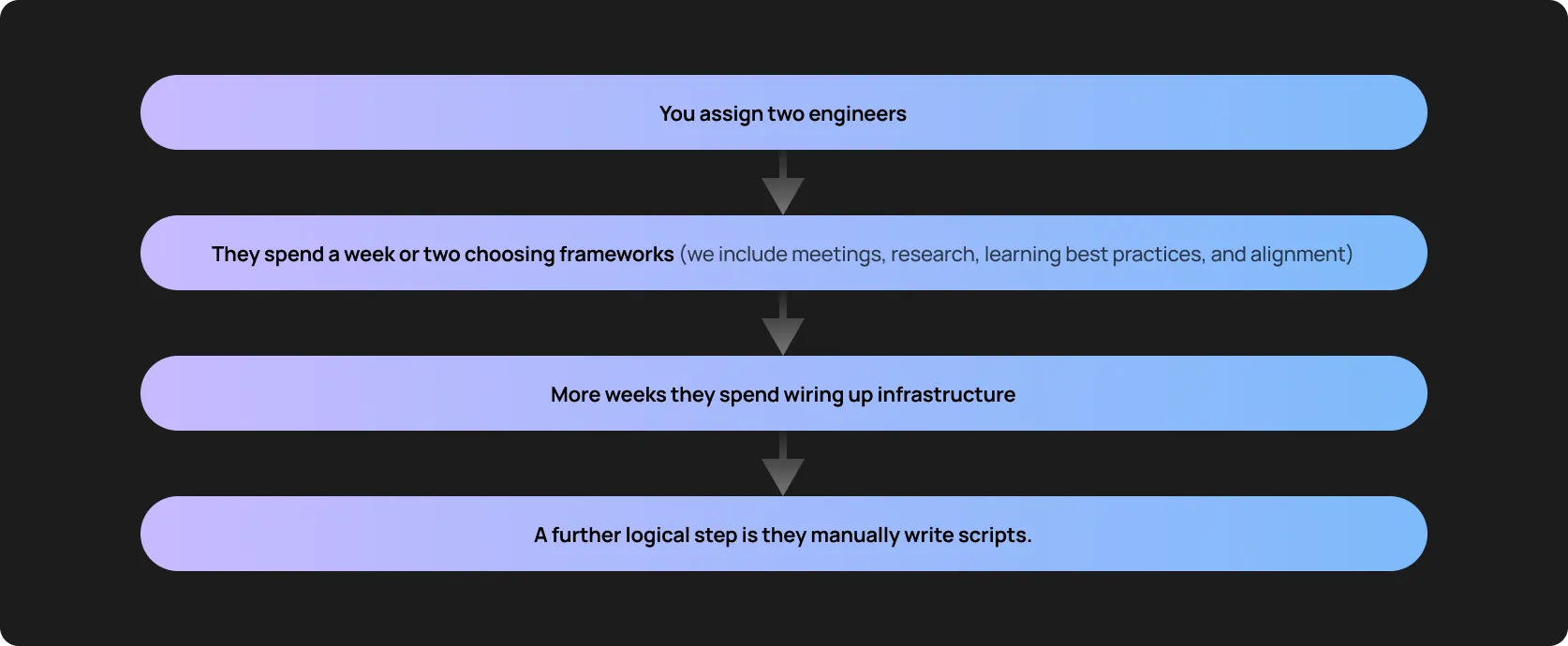
Only then can you see the first tangible result.
But there is a trick — the product has already changed. Do you want math? We’ve done it for you:
Two mid-level engineers spend three months building and stabilizing an initial suite, which is around 1,000 combined engineering hours, give or take.
Given USD 60-90/hour, the company spends USD 60,000-90,000 before automation even begins delivering ROI.
And the actual business cost hits hard: every week spent configuring webdrivers or writing boilerplate is a week where bugs likely slip into production. In turn, this may create additional load on your customer support and bring about user churn.
You don’t need weeks to pass this zero-to-automation way.
If your app isn’t too complex and sophisticated, modern software testing tools integrate into the CI/CD pipeline in days: they learn application behavior, map user flows, and generate relevant tests.
This guide shows how to build a complete test suite with modern solutions, and speaking more broadly, where we see AI for QA automation value.
Why AI is ideal for building a test suite from scratch
One of the main challenges in software testing is to make it fast and cheap (just like there are other challenges in business, huh?)
Traditional automation was a logical step toward this goal: it saves some time and money, but only if your app doesn’t change. Yet, the times passed by, and it’s hard to imagine a profitable (in any sense) app with fewer than 4 builds per month.
Traditional automation stays on documentation, test cases, proper setup, and predefined acceptance criteria.
AI test automation tools change this paradigm. They scan DOM structure, network calls, state transitions, and user events to step aside rigid structure and build a behavioral model.
Then, AI replays that behavior across roles and infers how flows connect, where there are state changes, and which outcomes signal success.
In other words, the product itself becomes the source of truth.
AI generates tests from real user flows
Backed by factual flows, AI-generated test cases are a significant advantage:
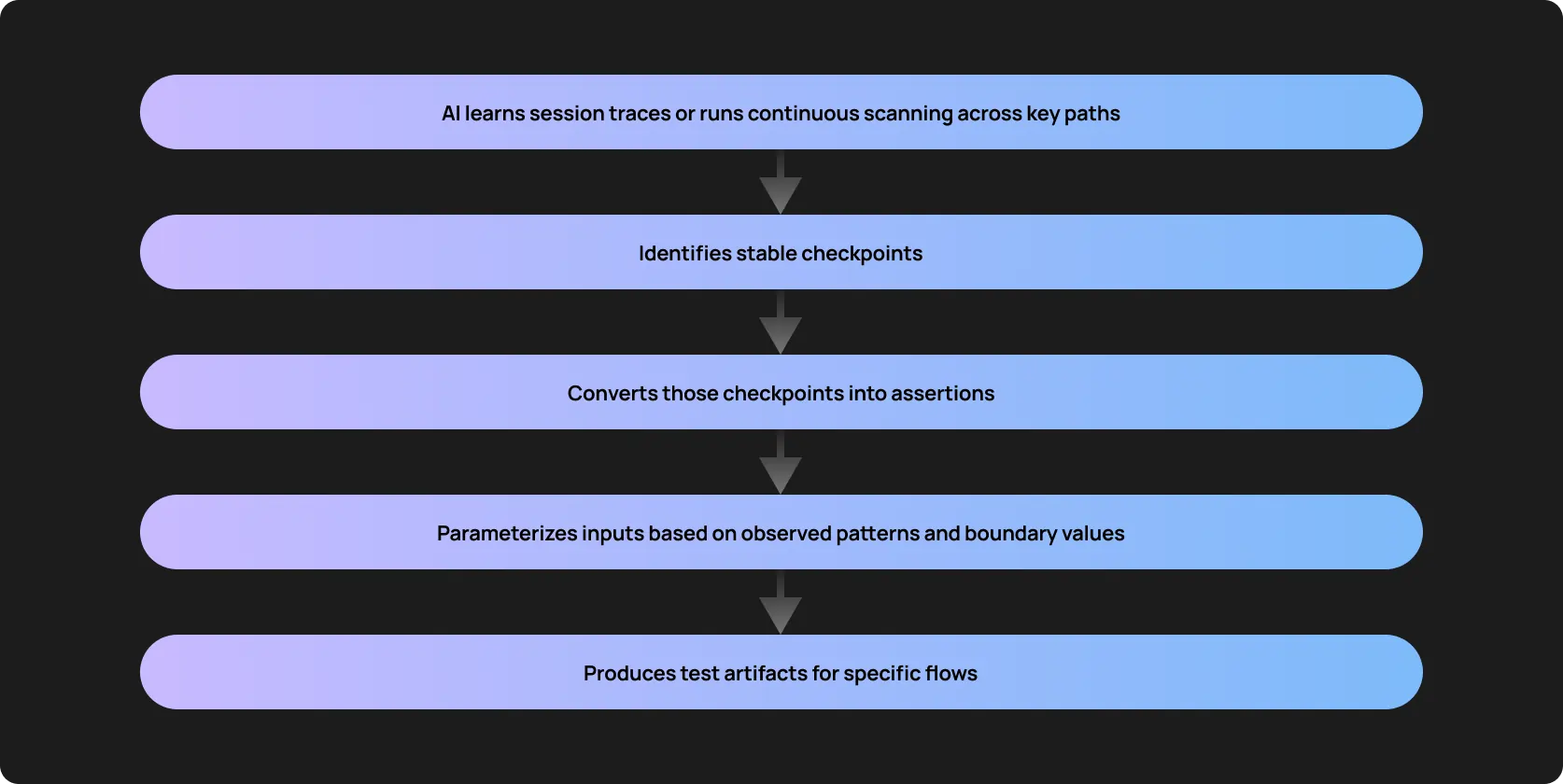
Hence, a test suite wasn’t made up by someone’s guessing or imagination, it reflects how users actually interact with the app.
AI handles locator stability
Classic automation relies on CSS paths, XPath chains, and IDs.
AI uses semantic scanning: it combines attributes, visual positioning, accessible roles, text meaning, and interaction context. This way, UI moves or class name changes don’t “confuse” the tool.
That difference removes one of the largest maintenance problems in traditional automation.
AI makes everything continuously
You’ll likely add new features to grow your software. Therefore, typical user flows will change. Many AI models autonomously detect drift in user behavior and update affected tests.
Let’s say you’ve added a confirmation step to the checkout. Modern end-to-end AI testing tools detect a new state transition and adjust the sequence accordingly.
With AI test generation, you don’t need to constantly rewrite scripts. Maintenance now means engineers review deltas instead of rebuilding coverage.
AI accelerates regression coverage exponentially
A typical baseline for an engineer is 5-10 meaningful end-to-end tests per week (note: this is just a conditional example; of course, everything depends on complexity).
A medium-sized product requires 150-300 regression tests to cover critical flows and variations. In sum, this is 3 to 6 months of effort for a small team. And this considers minimal rework.
AI shortens this time lapse drastically. Even if you generally accept only 60-70% of the generated tests (a regression suite, for example), the coverage you were building for months would take days.
Time savings = money
Two engineers need roughly 12 weeks to reach 200 stable tests manually. AI produces the same base suite in 3-5 days with validation. Time compression is 10-15x.
- Earlier regression confidence
- Faster CI integration
- Reduced manual QA dependence
- Faster release readiness
This way, you save money on salaries and earn money on faster releases (and potentially, on widening your market share or, at least, user trust).
The ABCs for building a test suite with AI
Autonomous test creation and maintenance is similar to seeds — to make them finally bloom, the engineering team should prepare the soil. Here is what they should check first.
If the environment is ready
- Stability: AI needs a reliable baseline. If your staging server crashes randomly or drops database connections, even the most advanced autonomous tool (especially the most advanced ones) will learn these failures as the norm.
- Versioned builds: AI is supposed to tie its execution data to specific commits.
- Logging: Exposing network requests and console errors helps artificial intelligence correlate frontend failures with backend exceptions.
If the core flows are identified
Identify high-impact journeys. Usually, they are standard:
- Signup/login: The fundamental gateway
- Checkout: Any flow directly tied to revenue
- Core screens: The primary ones users interact with daily
- Key business paths: Your unique high-risk workflows
AI can discover flows, but prioritization should be your responsibility at very beginning.
Access and credentials
- Test accounts: You created isolated accounts specifically for your smart testing tool. If you use shared human accounts, concurrent sessions will cause state collisions.
- Role-based access: If your app has different user tiers (Admin, Viewer, Editor), the testing tool needs credentials for each.
- API tokens: Backend access allows the tool to inject data directly or clean up the database after execution.
CI/CD integration readiness
Automation only creates value when integrated into pipelines. The pipeline must support parallel execution and artifact storage for logs and screenshots.
So ensure compatibility with:
- GitHub
- GitLab
- Jenkins
Step-by-step guide on how to build a test suite from scratch using AI
We like frameworks, especially if we don’t need to make them from scratch :) So, we can adjust a common marketing framework to software testing.
When building test automation from scratch, you should focus on the entire testing system: Why, What, When, Where, and How you test.
Below are seven specific phases you’ll likely go through implementing this. The most critical, yet often overlooked, phase is the human validation step. Blindly trusting machine output is an anti-pattern: AI will definitely speed up your move, but if your move is in the wrong direction, the car will crash.
Step 1. Map your application flows in the discovery phase
Artificial intelligence helps to build the application state graph.
During discovery, the tool analyzes at least 5 directions:
- Navigation patterns across roles
- Common user paths and drop-offs
- Conditional branches (feature flags, role-based screens, payment variations)
- API interactions and request/response dependencies
- UI state transitions and validation triggers
The unobvious nuance: Don’t run the discovery purely on unauthenticated pages, run discovery across multiple roles and seeded datasets. A new user and a returning subscriber have different perceptions of your product, right? So, they should have different flows.
Step 2. Select the critical flows to automate first
A zero-to-automation journey takes time and ideally should be gradual — overnight implementation is a myth. Your implementation plan should have clear priority tiers: business impact, transaction frequency, and historical failure rates.
Where do they usually start:
- Authentication
- Onboarding
- Account settings
- CRUD flows
How to assign priority? Revenue. If a bug in the flow directly prevents a user from finalizing a transaction, make your testing tool cover it first.
So, checkout and payment setup are your main targets for the start.
Step 3. Generate initial test cases
Your tool will create functional flows, key validations, and data-driven variations. At the time, it’d have the baseline map and would be able to create test steps.
This means that under the hood, AI has specific checkpoints that let it understand tests “succeeded”. For example, successful authentication tokens, order confirmations, and database state changes.
Step 4. Validate and refine AI-generated tests
At the intro to this section, we mentioned that this stage often causes problems because people frequently skip it. Or at least validate AI’s outputs less carefully than they should.
Humans must (this subtitle wasn’t written by AI, so keep it easy):
- Review flow logic
- Confirm expected behaviors
- Add edge cases
- Approve AI reasoning
Mini AI QA guide: Break down validations into short cycles. Review batches of 10-20 tests. Smaller batches improve reasoning accuracy and reduce cognitive overload.
Step 5. Integrate AI tests into CI/CD
Configure your pipeline to run smoke tests on each PR and generate stability reports on merge. The AI execution engine hooks directly into your deployment pipeline and blocks bad code from reaching production.
Step 6. Expand coverage
This step is especially important for frequently changing apps. Autonomous tools auto-discover new flows introduced by new features, UI redesigns, or backend modifications.
Namely:
- Newly introduced UI components
- Backend endpoint additions
- Flow modifications from feature releases
- Removed or deprecated states
When new branches appear in the behavioral graph, an AI model proposes additional tests automatically.
Hands-on nuance: Enforce review thresholds for new tests tied to feature flags. Early-stage features may produce unstable flows that should not yet enter regression packs.
Step 7. Maintain stability through self-healing
Self-healing is the essence of autonomous tools. They fix (“heal”) every broken test that “serves” a changed element.
Selector updates, drift in flows, unexpected UI changes — if a developer refactors a login component, the tool uses visual and semantic markers to heal the locator at runtime.
Important boundary: Behavior changes should trigger review, not silent healing. A renamed button is cosmetic. A changed validation rule is business logic.
What your AI-built test suite should include
A generated suite is only as good as its structural components.
Core functional flow coverage
Ensure the suite covers 100% of business-critical paths. What paths are business-critical? Those that generate revenue or control access. To minimize human (or, on the contrary, machine) errors, use auto-validation mixed with human-in-the-loop checks.
Negative scenarios
Testing the standard path is insufficient: AI generates invalid flows → injects bad data → verifies error validations. It checks how the system behaves when:
- The customer uses incorrect credentials
- There are expired sessions
- The checkout stage contains invalid payment data
- There are just missing required inputs
Edge-case handling
Machines operate on much bigger amounts of data than humans. Therefore, it’s logical to hand over the information processing to them.
Modern testing tools identify unusual states by detecting behavioral patterns and simulating network latency, interrupted sessions, and concurrent logins to expose hidden race conditions.
API-level validations
Optional but impactful. Connecting UI actions to backend assertions ensures data consistency across the entire stack.
Regression pack
The baseline suite runs on every major release to guarantee that legacy features remain intact.
Stability metrics
You can’t manage what you do not measure. Start with:
- Flakiness rate
- Drift detection frequency
- Broken flow clusters
- Risk score per build
There is an unobvious benefit by the way. With metrics, it’ll be easier to communicate changes in your testing strategy, budget allocations, and any other ideas to leadership.
Common mistakes when building a test suite and how to avoid them
We all know how crucial software testing is. But still, we commonly measure this importance with business metrics. And how about lives?
In 2003, St. Mary’s Mercy Hospital auto emailed 8,500 patients that they had passed away. The hospital had recently upgraded its patient-management software system, and a mapping error in the software resulted in the system assigning a code of 20 (which means “expired”) instead of 01, which meant the patient had been discharged.
The icing on the cake is that the erroneous data was also sent to insurance companies and the local Social Security Office.
The mistakes listed below mirror the guide on how to build a test suite with AI above, but we thought it’s important to reiterate. Maybe, we’d save some lives.
Trying to automate everything at once
As we already said, 100% coverage in one day is a myth. Even if you complete this challenge, it can backfire with broken processes, inconsistent documentation, and a burnt team.
It’s not necessary to map and generate tests for every single settings page, footer link, and edge-case form, as this creates an immediate maintenance bottleneck.
Start small: automate the top five revenue-critical flows, stabilize them in your pipeline, and scale the coverage horizontally.
Letting AI cook without a cookbook
They say, the progress of artificial intelligence doesn’t worry us, the regression of natural intelligence does. AI is not a flawless oracle, it needs human review.
If the machine maps a checkout flow but skips the promo code validation step because the UI element was hidden, an unreviewed test will pass while missing a critical business rule.
No CI/CD integration
Locally triggering a test suite to run it is useless. If the AI-generated tests are not integrated directly into GitHub Actions, GitLab CI, or Jenkins, they will quickly fall out of sync with the main branch.
Ignoring the test data strategy
AI can click buttons perfectly, but if it submits a hardcoded email address like testuser@mail.com into a unique-constraint database column, the test will pass exactly once and fail every time after.
Use controlled data flows and feed the model the info it needs to generate randomized payloads and utilize API endpoints, and clean up the database after the execution.
Relying on locators or XPath
If you configure your AI tool to output traditional XPath or strict CSS selectors, you negate the primary advantage of autonomous systems.
When the frontend team refactors a component, those selectors will break. And your engineers (including high-paid ones) will rewrite all of that.
Semantic understanding, visual markers, and accessibility tags allow AI’s self-healing mechanisms to function when the UI shifts.
Who benefits most from AI for QA automation
You won’t see your son playing in the UCL final after the first training session. You don’t want your daughter to dance in the Dance World Cup after a free intro lesson.
You don’t steer an F1 bolid without enough racing practice.
Different teams have different maturity levels and not every engineering team needs AI-driven solutions immediately — they’re just not ready for them. So, who benefits from autonomous software testing the most?
- Startups with zero automation (to some extent): Confusing beginning, right? We just said about immaturity, and here we are. But the trick is that teams building the v1 of their product can skip the traditional setup phase entirely and achieve baseline test coverage in days instead of hiring a dedicated automation engineer.
- Scale-ups with fragile test suites: Have legacy Selenium or Cypress setups, and your suites break on every release? You can easily replace the brittle scripts with self-healing AI flows.
- Teams with limited SDETs: Let’s say 10-to-1 developer-to-QA ratio turns manual testing into a bottleneck. AI multiplies capabilities even in small QA teams.
- Fast-moving SaaS with weekly/daily releases: Continuous deployment requires continuous testing. That’s simple.
- Products with dynamic UIs: E-commerce sites, media platforms, and highly customizable dashboards change frequently. AI’s got you covered.
- Teams overwhelmed by regression testing: Organizations burning hundreds of hours per month manually clicking through legacy features can offload the entire regression burden to autonomous agents.
When AI alone won’t solve test suite creation
95% of enterprise GenAI pilots fail to deliver a measurable return on investment. Okay, it’s giving exaggerating fleur, because only 5% of such projects reached the production phase. But exactly because execs didn’t see relevant value in previous stages.
The situation is also interesting across task-specific and general AI models.
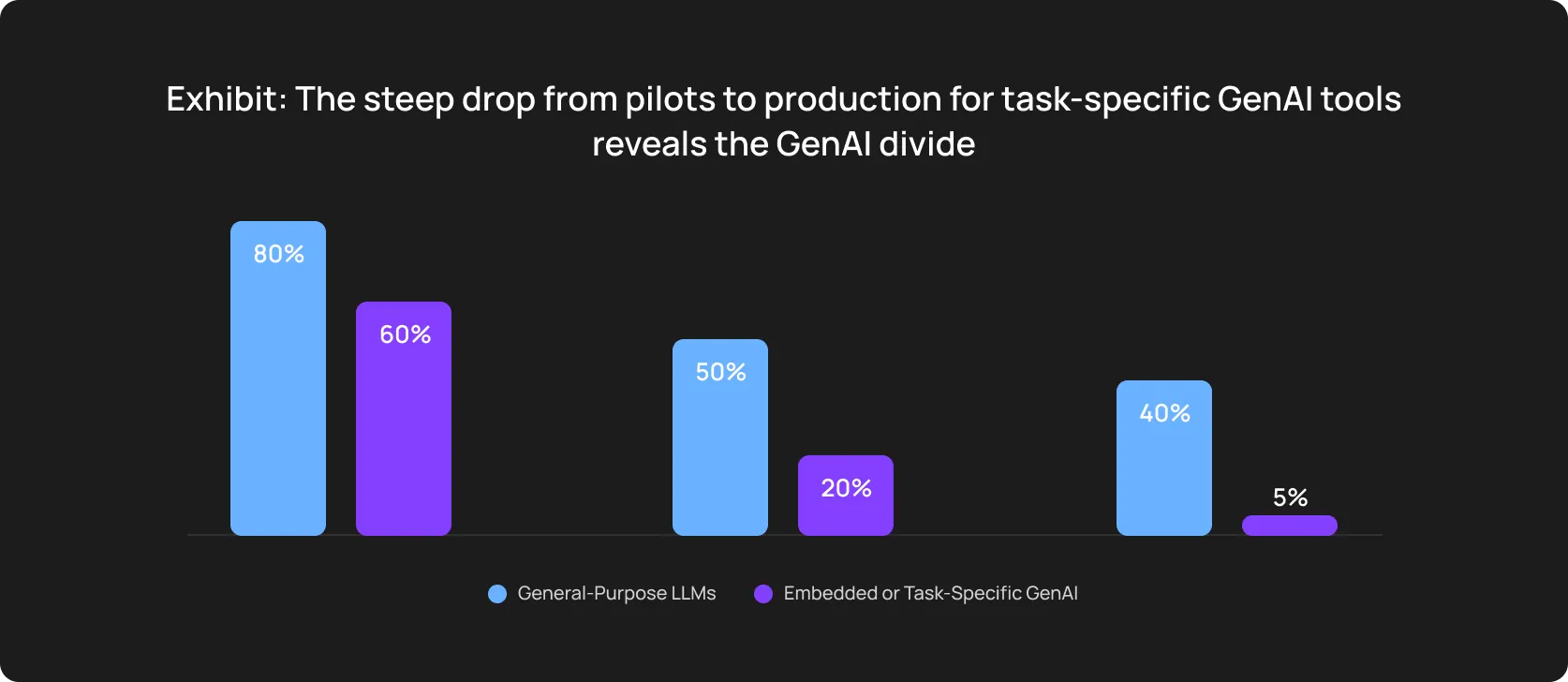
Another reminder that AI isn’t a magic wand. Specifically, it may not deliver tangible value in building test suites from scratch if…
- If the environment is unstable: AI needs a deterministic baseline. If your staging server drops database connections or returns 502 errors randomly, the AI tool will learn that these infrastructure failures are normal behavior.
- If core flows change daily: A product in the rapid prototyping phase lacks the structural permanence. And this is a core requirement for automation.
- If there is no QA owner: No manual scripting. Yet, someone must still govern the quality strategy.
If you don’t have proper documentation: If your own developers can’t define how the application should handle a specific error state, AI won’t invent the wheel.
Stabilize your environment first, then build the suite: lock down a dedicated staging server, seed your database with consistent, version-controlled test data, and define ownership for test artifacts and validation.
How OwlityAI builds and maintains test suites automatically
OwlityAI allows to shift your team’s focus from writing boilerplate code to analyzing product risk. You handle the strategy and initial setup, and OwlityAI takes over all operational routines after.
- Automatic flow discovery: The tool continuously explores your product and maps navigation paths, state changes, and API calls.
- AI-generated test cases: Your test suite setup begins with the testing goal. When you have it defined, the tool builds the executable steps, generating data payloads for both positive paths and negative edge cases.
- Semantic and visual UI understanding: The engine interprets the interface roughly as a human user. It interacts with elements based on their functional purpose.
- Automatic maintenance and self-healing: When frontend developers refactor a component, OwlityAI repairs locators dynamically at runtime.
- Drift detection across releases: It also tracks the structural state of your application over time. If a critical step suddenly disappears from a user journey, OwlityAI alerts you.
- Failure clustering and real-time triage: When a microservice outage triggers 40 simultaneous test failures, OwlityAI groups them into a single root-cause ticket. You don’t need to run through separately logged tests and figure out what forced them to fail.
- CI/CD integration: Our solution helps you get the most out of smart software testing through native integration into your deployment pipeline.
- Rapid onboarding for QA teams: No need for extended QA experience, no need to decipher OwlityAI manuals to fine-tune the tool. Your team can handle complex suites without learning new scripting frameworks.
OwlityAI can generate a stable test suite in hours and keep it stable as your product evolves.
Bottom line
Over the past years, building test automation from scratch has never been easier than now. But this can come back to bite you. If you didn’t collect a structured and clear dataset, stabilize the environment, prioritize the business goals and the software testing impact on them, no technology can help you.
Zero-to-automation journey takes time, but it also takes your managerial expertise and the ability to structure your approach.
If you are ready to change the way you test, book a call with our experts to learn more about OwlityAI’s value for you.
Monthly testing & QA content in your inbox
Get the latest product updates, news, and customer stories delivered directly to your inbox