
AI testing for multi-language UI applications

Dmitry Reznik
Chief Product Officer

Summarize with:
We can’t recall global software in a single language as of 2026. Dropbox, Shopify, and other platforms understand that language is a direct bridge to sales, so they support dozens of languages.
Canva, for example, supports 100+ interface languages, and its AI assistant now accepts prompts in 17 languages.
E-commerce and enterprise systems routinely require region-specific translations, cultural formatting, and compliance variations.
Netflix takes an advanced approach and localizes its plans, while keeping the pricing page unique for each GEO so that users from other countries can’t compare the pricing tags.
Netflix localized pricing
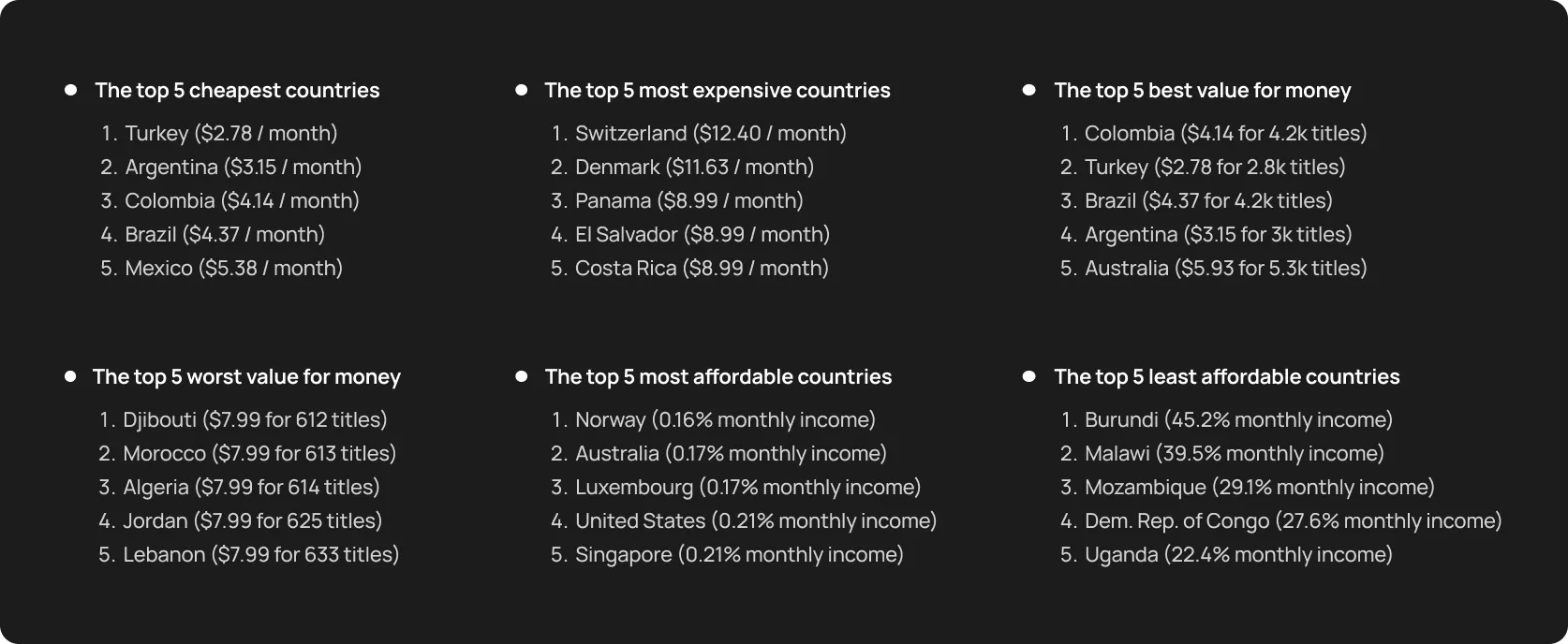
We gathered here for testing topics, didn’t we? So let’s highlight the most common pitfalls in multilingual QA strategy:
- Locators: CSS or XPath selectors tied to English text fail when labels change
- Text variations: Hardcoded assertions for “Submit” fail when the button says “Enviar”
- Layout shifts: Right-to-Left (RTL) languages like Arabic or Hebrew flip the UI
AI multi-language testing changes this game. It combines visual understanding, semantic recognition, layout interpretation, and intent-based detection to make tests reliable across languages and structures.
Let’s break this topic down step by step.
Why multilingual UI testing is that difficult
Interface translation looks like a copywriting problem until you test your app on a wide range of user segments, including other cultures, nationalities, and specializations.
Because other words often reshape the interface itself, including design, whitespace, and sometimes even user paths. Hardly can traditional tests handle this.
1. Text changes across languages break selectors
Many teams still rely on text-based locators in their test scripts:
- Click the Submit button
- Find the Learn more link
- Verify the Welcome back banner
And then, your app is going to enter – let’s say – the German market. This is where the fun begins.
In this language, phrases stretch significantly:
- The “absenden problem”: A Submit button has 6 characters in the English interface. It might fail when it becomes Absenden (8) or In den Warenkorb legen (19) in the German interface. Another example — Einstellungen verwalten takes far more space than Manage settings.
The Unicode barrier: Japanese, Chinese, or Korean use double-byte characters. If your test scripts or backend aren’t configured for UTF-8, these characters render as empty boxes, causing visual tests to fail.
Another aspect of the challenge is the text orientation — the Arabic or Hebrew interface should switch into right-to-left (RTL) mode and reorder the visual hierarchy.
Text-based selectors become brittle, tests fail for reasons that have nothing to do with real product defects.
2. Layout shifts cause element movement
From the orientation property discussed above to intent issues, the more complex your product, the more sophisticated your testing should be.
A test that passed yesterday, because an element sat neatly in one place, can fail tomorrow simply because a Japanese label pushed some elements out of the main menu.
3. Dynamic content varies by region and locale
UI testing across languages is not the only scope. Apart from language, we have different user segments, specific GEOs, and sometimes a traffic source. This affects content, pricing, CTAs, and sometimes — regulatory restrictions (or permits).
- Localized offers: A user in Tokyo might see a “Lunar New Year” banner that won’t be shown to a user in London. Traditional scripts looking for specific image IDs or text headers will fail if they aren’t context-aware.
- Regulatory banners: Specific regions require GDPR or CCPA banners that can block the UI or change the interaction flow.
Testing interface in different languages → Testing multiple versions of the product and, in some sense, a product for another mindset.
4. Hard-coded test data fails across languages
The problem with many legacy test suites is that they usually look for “stable” validation messages and error texts, like “invalid email address”.
They pass in English and German, but fail in French, where the formulation is a bit different. Required fields may change depending on locale (for example, tax IDs or postal formats).
5. Unique edge cases in localization
Most teams never encounter such problems in a single-language product. Unicode characters can break input validation.
- Currency and number formatting: A price of USD 1,000.50 in the US becomes EUR 1.000,50 in Germany. If your current script doesn’t understand different separators, it will incorrectly flag valid data as a bug.
- Date/Time formats: RTL alignment changes how users visually scan a page. Currency symbols move before or after numbers, decimal separators flip, and date formats swap from MM/DD/YYYY to DD.MM.YYYY.
Individually, each of these seems minor, but coupled, they create a combinatorial testing problem. Let’s hash out how semantic AI testing helps to solve it.
How AI solves multi-language UI testing challenges
Traditional automation reduces mechanical effort, but it doesn’t solve the semantic variability introduced by translation and layout shifts.
The AI usage for fixing localization issues is not that common as the general LLM usage is relatively young and we are all early adopters compared to other technologies and approaches in the industry.
Yet, some researches show that combining structural understanding with language-agnostic reasoning reduces brittle localizations by nearly 44% compared with baseline methods in controlled experiments.
The key to AI multi-language testing is that the tool goes beyond code‑level checks and actually interprets the interface — visually and semantically. Natural Language Processing and Computer Vision allow modern models to maintain a stable multilingual QA strategy.
Semantic recognition, and not text-based
Traditional scripts are too straightforward: the string Submit should be translated literally, otherwise the script fails. AI, in turn, identifies elements by their purpose and contextual role.
Submit, Absenden, Enviar, Надіслати — all these CTAs have the same functional purpose based on their position at the end of a form and their interaction with the backend API.
You just need one test flow for the sign-up, and the testing tool automatically maps it to every language in your baggage without requiring localized locators.
Visual understanding and layout flexibility
When German text expands or Arabic flips the layout, there is nothing traditional automation scripts can rely on. AI uses computer vision to “understand” the visual architecture of the page.
- Pattern recognition: Modern AI test automation tools can distinguish different shapes of a checkout button. Move it left or move it right, or grow 50px wider, artificial intelligence knows it’s the same component.
- Structural rule of thumb: AI understands that a field that is under a label “Email” is an email input, regardless of whether that label says “Email”, “Correo electronico”, or “电子邮件地址”.
Intent-based flow understanding
Despite artificial intelligence is a machine, it doesn’t execute a mechanical job. It grasps business logic and understands the intent of a specific user path, from an onboarding flow to a password reset sequence.
If the Japanese version of your app requires an extra field for Phonetic Name (Katakana) that the English version doesn’t, a traditional script would crash. AI recognizes this as a local variation of the user profile intent and adapts its navigation to satisfy the requirement.
Text-independent locator strategies
Smart locators combine:
- structural metadata and ARIA roles
- contextual cues from neighboring elements
- behavioural patterns from interaction history
That is, tests are anchored on behavioural signatures instead of fragile text or layout positions. AI generates locators based on the component’s internal structure and role within the application’s state machine, making it virtually immune to text-based regressions.
AI modeling user behavior across languages
The model compares executions across locales to detect functional divergence.
- Parity detection: A simple example: when an English version of the app during checkout has four screens and a Spanish one has five due to regulatory messaging. This is actually a purpose for AI testing localization.
- Automated parallelization: The model executes the journey across 20 languages simultaneously to verify that the outcome is consistent.
Automated detection of localization defects
Language fatigue is something all humans experience when constantly working with different formulations. Scripts don’t speak, and AI never tires of looking for visual glitches.
- Truncation and overlap: AI detects when text is cut off by a container boundary or when a long German word overlaps an adjacent icon.
- Linguistic spots: It can flag machine translation artifacts: untranslated text, just lorem ipsum placeholder, or incorrect currency symbols.
Types of tests AI can generate and maintain across languages
As software testing professionals, we are most interested in what goes beyond the form (words, spacing, directionality, and visual density) — we test the logic and the function first, even during changes.
Modern AI end-to-end testing tools don’t use the mentioned surface as a beacon, they learn and understand the logic underneath. And that’s why AI for UI testing becomes less about “running scripts in 12 languages” and more about preserving intent across the mentioned 12 “cultural worldviews and behavioral patterns”.
Core functional flows
Advanced ML models ongoingly learn from your app. Particularly, they scan a user journey in the core language and autonomously execute it in others according to your operational GEOs: Japanese, Arabic, German, etc. That is, you don’t need to rewrite separate test code per language — the model replays the same core journey.
- Sign-up and login: Verifies that a user can authenticate regardless of whether the button says “Log In” or “Connexion”.
- Add to cart: Checks if the item count gains and adds up correctly and ensures localized number formats (even if the difference is just a comma or a dot — 1,000 vs 1.000).
- Checkout: Validates that the payment gateway loads the correct regional options (e.g., SEPA for Germany, iDEAL for the Netherlands) instead of defaulting to a US-centric credit card form.
Form validation rules
A common pitfall during UI testing across languages is ensuring the validation criteria match local nuances and requirements.
For example, a regex that enforces US phone formats (555) 123-4567 will block a valid UK number +44 20 7946 0958.
Proper cross-language automation dynamically detects the locale context and adjusts validation criteria to accept or reject the user’s input.
Navigation flows
Navigation should remain clear and accessible even when the text slightly shifts when switching between language versions.
The burger trap: In German and other “long-tailed” languages, long menu labels often force the navigation bar to collapse into a “hamburger” menu on desktop widths. AI detects this state change and correctly interacts with the collapsed menu instead of failing to find the visible links.
Error messages and warnings
An error appeared on the screen…and what?! That’s the question AI testing tools look for the answer to. The fact of error displaying is not enough, you must check if it makes sense.
Pitfall: Such “placeholder” errors (like Error: missing_translation_key_101) can appear in production.
A modern autonomous testing tool scans for untranslated string patterns and flags them as defects, rather than just checking for the presence of a red box.
API-level validation
True story: While the interface displays the product price in euros, the backend processes it according to the target region.
So AI-powered testing tools verify the consistency of the logical chain: A user selects France during sign-up → the API payload sends country_code: “FR” and currency: “EUR”.
Layout and visual integrity
- RTL mirroring: In Arabic or Hebrew, AI model checks that not only the text is right-to-left, but that icons and progress bars are mirrored correctly, too.
- Truncation detection: It visually scans buttons and containers to ensure that expanded text hasn’t overflowed its boundaries or become unclickable.
Important nuance: This is more a kind of visual reasoning — this label should not overlap this field, regardless of language.
Practical engineering guide: Where to start AI testing localization
You are reading a blog of a product company; yet, we intentionally don’t mention OwlityAI in every single paragraph. You can apply the following recipe with any relevant AI testing tool. Just ensure it has all the features OwlityAI does with a feasible cost-ROI balance 🙃
Step 1. Tune the tool to map the end-to-end flow
List all the languages you have. Then, run your AI testing tool on your primary language: it’ll map a so-called happy path and identify all interactive elements.
Point the same agent to your localized staging environments, and it should automatically flag structural variations.
Step 2. Generate tests for functional parity
The main trick in leveling up your testing is to shift your thinking and decision-making process. To be more down-to-earth, AI allows you to let off thinking of testing as a batch of scripts for specific conditions.
In our example, you won’t write separate scripts for Spanish and French. You rather define mindset and specific behavior in every culture and, hence, locale. This will clarify intents in every stage of using your product (sign-up, exploring the app without registration, purchase, etc.).
And only then will the testing model generate the execution steps for every locale, ensuring that the core business value is delivered regardless of language.
This might sound expensive, especially if you’re comparing all the scopes to manual execution. Calculate the ROI of consolidating this into one AI workflow.
Step 3. Use semantic recognition to avoid text-based locators
Stop using XPaths tied to labels/positions. Semantic attributes or visual anchors ease off testing game completely. This ensures that when “Submit” becomes “Trimite” (Send), the test doesn’t flake.
Step 4. Validate logic differences with API-level checks
Add assertions to verify that locale-specific business rules are respected, for example:
- The date of birth picker should respect the DD/MM/YYYY format for UK users and MM/DD/YYYY for US users
- The address form should enforce “State/Province” only for countries that actually have them
This step solves many silent localization bugs that look fine visually but are wrong logically.
Step 5. Run visual checks across locales
Set up automated visual regression runs for your top 5 critical pages across all supported languages.
Configure the sensitivity to ignore minor pixel rendering differences (anti-aliasing) but catch major layout shifts. Pay attention to the payment module/screen/page/section.
Step 6. Track drift across versions
Set an autonomous testing tool to monitor drifts when a new feature (like 2FA) is released in English, but the corresponding UI elements are completely missing in the Italian build. Other aspects AI can spot the drifts in:
- flow structure
- layout patterns
- validation behavior
You’ll get a signal from the tool if anything breaks.
Step 7. Automate regression for all languages
Don’t run a full suite for a single English version and a smoke suite for others. Parallelize running the critical flows across all languages simultaneously on every release candidate.
KPIs that improve with semantic AI testing
Two things to mention first:
- Tech leaders should carefully choose metrics to optimise
- They also should avoid vanity
Yes: We’re reporting 100% test coverage across 20 languages.
But: We simply have run a script that checks if any text is present on the page.
Funny, but only reading this blog, and when your test passes, displaying “Lorem Ipsum” to a Japanese user, it quickly becomes not that fun.
Genuine KPIs for multilingual QA strategy
- Reduction in flaky localization tests: You change the text in buttons and other web elements, and still ensure fewer false positives caused by it
- Faster release cycles for new locales: New languages ship without proportional increases in QA time
- Lower maintenance cost: Your engineers spend less time fixing bugs and more time developing features
- Higher test stability: Stability scores improve because logic anchors
- Fewer UI regressions: You catch visual and structural deviations early
- Faster detection of localization bugs: Defects surface closer to commit time
- Improved parity between language versions: Functional divergence between locales decreases over successive releases
Overall, fewer emergency patches, fewer rollback releases, and shorter feedback loops for global product teams.
When AI won’t fix multi-language issues (yet)
AI-augmented testing is not a cure-all for every localization challenge. It can’t fix fundamental process issues upstream, but it definitely can make your chaotic pipeline faster.
AI will fall flat when
- Localization content is inconsistent or incomplete: As a machine, artificial intelligence needs a knowledge base and a foundational understanding — what’s normal. If you don’t feed it this information, it will either create its own norm baseline that may not meet your expectations or not determine this norm at all.
- Business logic differs by region: When the core functionality and the app’s purpose are different for different countries/regions, you should create a more sophisticated knowledge base for your testing tool so that it can diverge its actions across locales.
- UI structure is too different across locales: It’s a reiteration of the previous point: if certain screens or flows exist only in some languages, automated comparison becomes contextual, and AI needs more data and a more determined action plan.
- The environment is unstable: Inconsistent build artefacts and data drift send automated inference down the drain.
- You don’t manage translation files: Untranslated keys, placeholder text, or inconsistent keys make even visual tests brittle.
Maintain a stable, key-based translation workflow (for example, standard i18n libraries). This way, you’ll get the most out of this modern technology.
How OwlityAI handles UI testing across languages
OwlityAI addresses the core challenges of AI for UI testing, like consistency in user intents across different GEOs, ensuring locale edge cases are covered, and many others:
- Semantic AI understands the UI purpose and allows tests to focus on it
- Visual recognition for layout-flexible testing
- Automatic flow mapping for each language
- Detection of localization drift and parity issues
- Wide “storage” for tests: you can manage tests in 5 to 50+ locales
- Self-healing selectors, which reduces brittle dependencies on language variants
- Locale-specific regression dashboards — your go-to choice for visibility into which languages are regressing and why
Our main reason was to create a reliable, scalable, and predictable testing system for global engineering teams. We hope that with OwlityAI, it has become much easier.
Bottom line
In 2019, Gartner predicted that AI would generate USD 2.9 trillion of business value and 6.2 billion hours of worker productivity globally in two years.
In 2023, McKinsey analyzed 63 use cases and found out that artificial intelligence, as a technology, could bring to the table from USD 2.6 trillion to USD 4.4 trillion annually.
You can ask, where is localization testing here? AI is still a growing technology, and it’s your decision what amount you can bet on it.
But if we focus on the present, your unshakeable gain is controlled and economically feasible software testing.
If you are ready to stabilize your multilingual QA strategy, you can book a demo in just one click.
Monthly testing & QA content in your inbox
Get the latest product updates, news, and customer stories delivered directly to your inbox